
How do I share a folder of favourite properties?
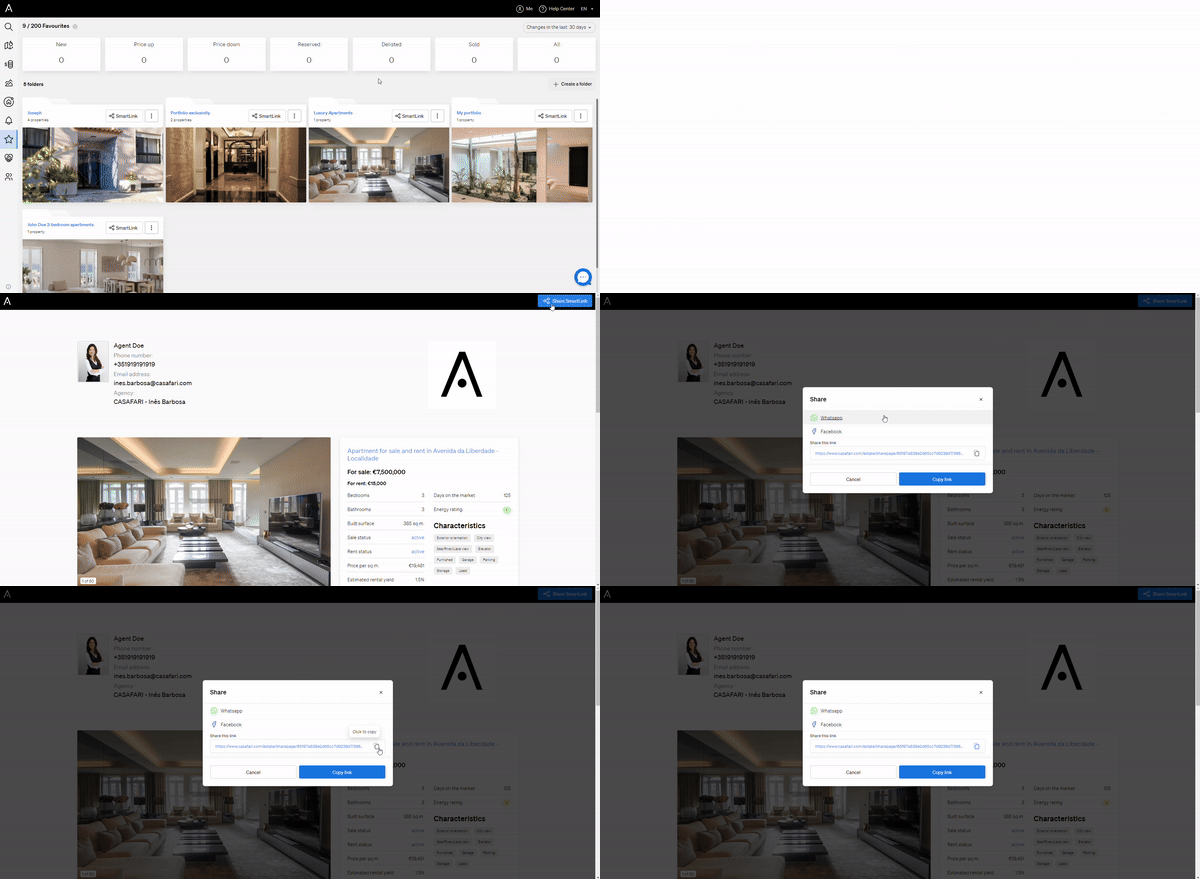
Open your Favourites page from the star icon in the vertical menu on the left of the Property Sourcing page, select the folder, click its Share or SmartLink button, then copy the link or send it via WhatsApp, Facebook or another platform.
Sharing a folder of favourites is a quick way to present selected listings to clients or colleagues.
- Go to https://www.casafari.com/login and enter your credentials.
- On the Property Sourcing page, click the star icon in the vertical menu on the left to open your Favourites page.
- Select the folder you want to share.
- Click the Share or SmartLink button for that folder.
- Choose how to share it: copy the link, or send it via WhatsApp, Facebook or another platform.
- Send the SmartLink to your clients or colleagues.
Good to know
- A SmartLink presents your selected properties in a clear, easy-to-view format that works well for sharing with clients.
- If you need help sharing folders or creating SmartLinks, email support@casafari.com or go to Help Center > Contact Us in the platform.
Last updated: