
How do I find properties listed by a specific agency?
Open the Property Search page, go to the Property / Agency section of the filter panel and type the agency's name under "With this agency" to see only its listings. To hide that agency's listings instead, enter its name under "Without this agency".
Filtering by agency helps you track a competitor’s portfolio or remove duplicate listings from a particular agency.
Show listings from one agency
- Go to the Property Search page.
- In the filter panel, go to the Property / Agency section.
- Type the agency’s name in the With this agency field.
- Tick one of these checkboxes:
- Exclusive: shows properties listed only by that agency.
- Non-exclusive: shows properties listed by that agency and also by other agencies.
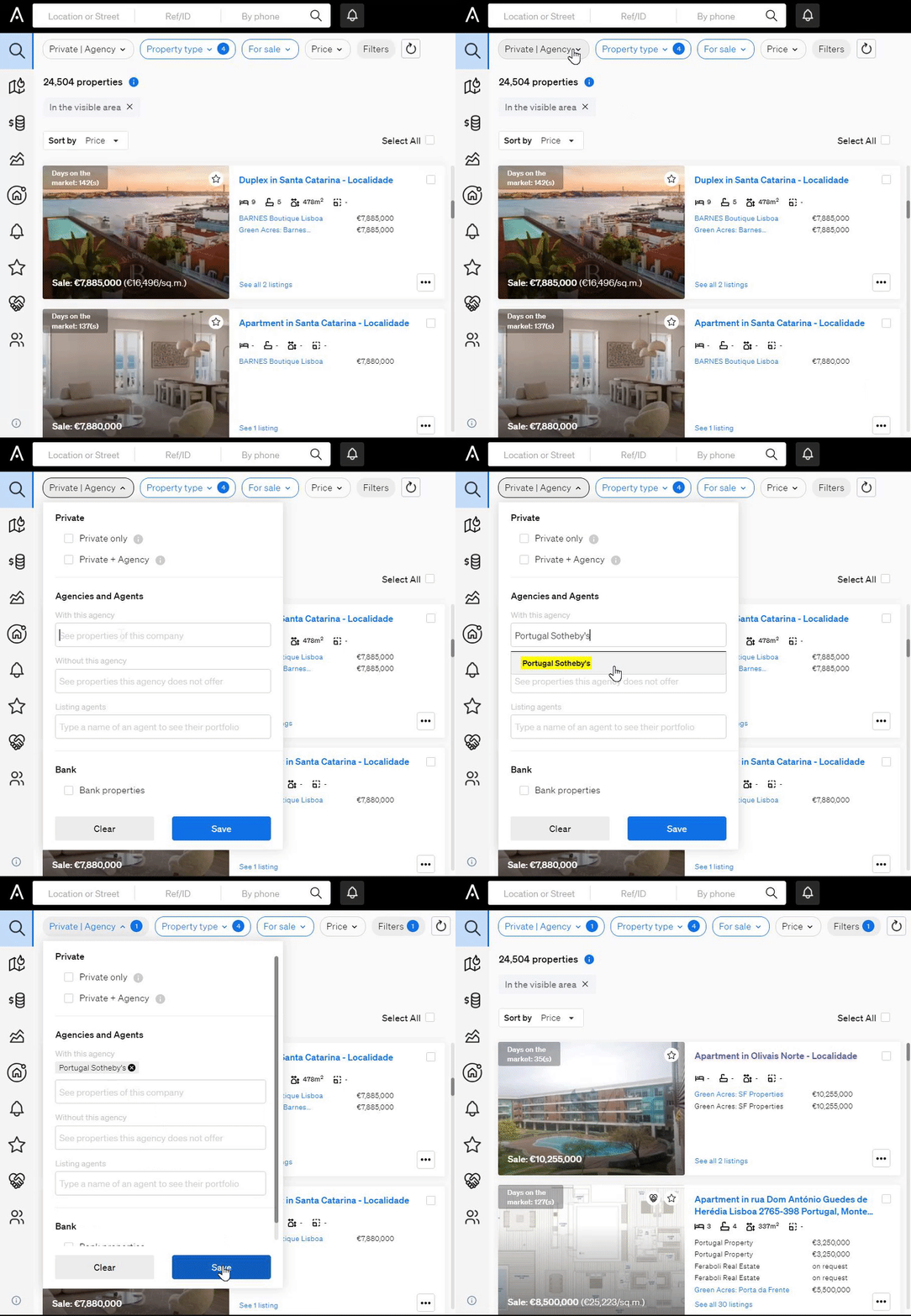
Hide listings from one agency
Type the agency’s name in the Without this agency field. The results will no longer include that agency’s listings.
Common uses
- Competitor tracking: monitor one agency’s listings.
- Lead qualification: exclude agency-listed properties to find unique opportunities.
- Portfolio comparison: see where agencies’ offerings overlap and where they differ.
- Avoiding duplicates: remove properties that a known agency already manages.
Good to know
- You can type the agency’s name directly into either field.
For help, contact support@casafari.com or go to Help Center > Contact Us inside the platform.
Last updated: