
How do I add a property to my favourites?
Click the star icon on the property, either on its listing card in the Property Sourcing search results or on the property page, then choose an existing folder or create a new one. The property is saved to that folder in your Favourites.
Before you start, log in at https://www.casafari.com/login.
From Property Sourcing
- Perform a search in Property Sourcing.
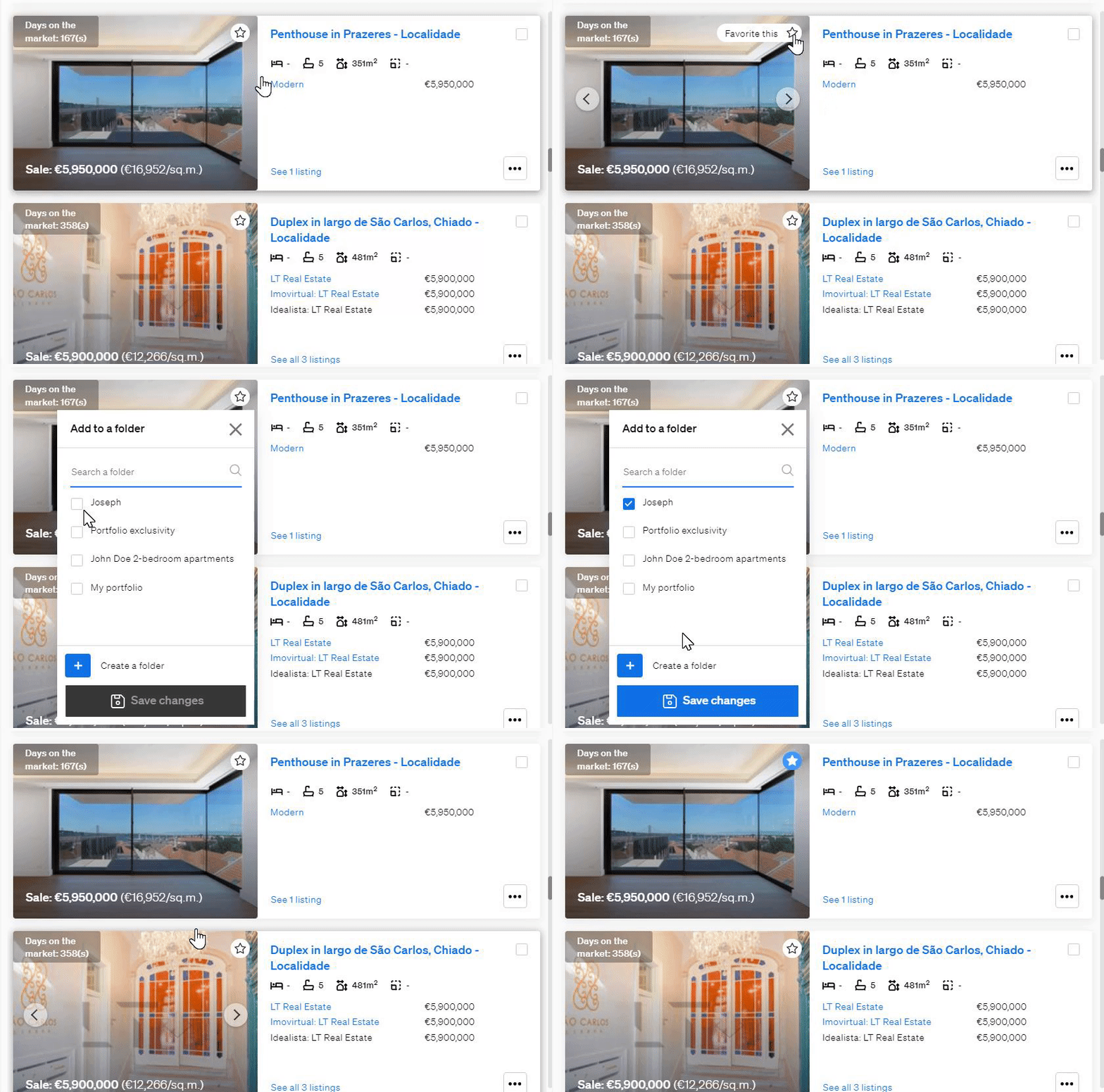
- In the search results, click the star icon on the top right of the listing card.
- Choose an existing folder, or click Create New Folder.
The property is now saved and available in your Favourites section.
From the property page
- Open the listing you are interested in.
- Click the star icon in the upper-right corner of the property photos.
- Choose an existing favourites folder, or create a new one.
The listing is added to the folder you selected.
Manage your favourites
You can rename, delete or share your favourites folders at any time from the Favourites section on your CASAFARI dashboard. You can also use your favourites to create and share SmartLinks.
Good to know
- Folders help you organise saved properties by client, project, location or preference.
- Shared folders let you work on the same selection with your team or your clients.
- If you need help, email support@casafari.com or go to Help Center > Contact Us in the platform.
Last updated: