
How do I manage and edit my alerts?
Open the Alerts section from your user menu or dashboard, select the alert you want to change, adjust its search criteria, notification preferences or name, and click Save changes. From the same list you can also delete alerts you no longer need.
- Log in to your CASAFARI account at https://www.casafari.com/login.
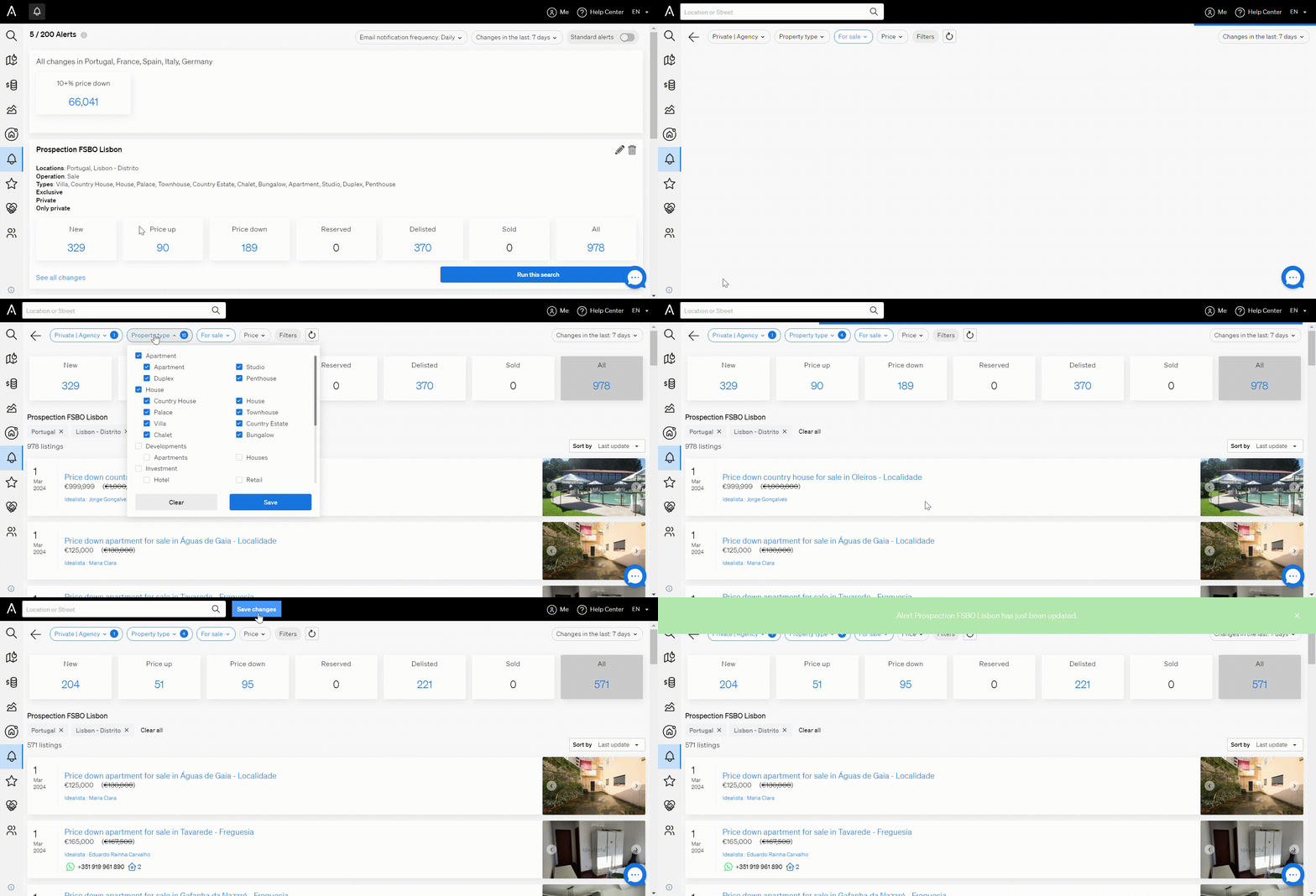
- Open the Alerts section from your user menu or dashboard. You can also go there directly at https://www.casafari.com/account/alerts?days=30&type=alerts.
- In the list of your active alerts, select the alert you want to edit.
- Change the search criteria (filters), notification preferences or alert name as needed.
- Click Save changes to update the alert.
Good to know
- You can delete alerts you no longer need from your list of alerts.
- Review and adjust your alerts regularly so the notifications you receive stay relevant and timely.
- If you need help managing or editing your alerts, email support@casafari.com or go to Help Center > Contact Us inside the platform.
Last updated: