
How do I know if a property is still available for sale or rent?
Open the property page and check the details table to the right of the photos. It shows whether the property is for sale, for rent, delisted, sold or rented. In Property Sourcing you can also filter results by these statuses.
- Log in to your CASAFARI account at https://www.casafari.com/login.
- Open the Property Sourcing tool.
- Use the filters to choose whether you want properties for sale or for rent.
- Use the filters to choose the status: still active, sold or delisted.
- Click a property in the results to open its property page.
- Find the details table to the right of the photos and check the status.
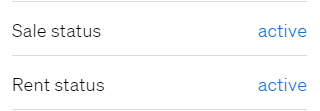
Status values
The details table shows one of these statuses:
- For Sale
- For Rent
- Delisted: the property is no longer available.
- Sold
- Rented
Good to know
- A delisted property was on the market before but is no longer available on the source website.
- For a delisted property, you can explore similar properties in the suggestions shown below the listing.
- If you are still unsure about a property’s availability, contact support@casafari.com or go to Help Center > Contact Us inside the platform.
Last updated: