
How do I create a folder for my favourite properties?
In CASAFARI, open your Favourites page using the star icon in the vertical menu on the left, click Create New Folder, give the folder a name (for example a client, project or location) and save it. You can then add new favourites to the folder or move existing ones into it.
Create the folder
- Log in to your CASAFARI account at https://www.casafari.com/login.
- Click the star icon in the vertical menu on the left to open your Favourites page. All your saved properties are listed here.
- Click Create New Folder.
- Enter a name that fits your organisation system, such as a client name, project or location (for example, “John Doe 2-bedroom apartments”).
- Save the folder.
Add properties to the folder
To save a property to your Favourites, click the star on the property. When you add a new favourite, select the folder you want to save it in.
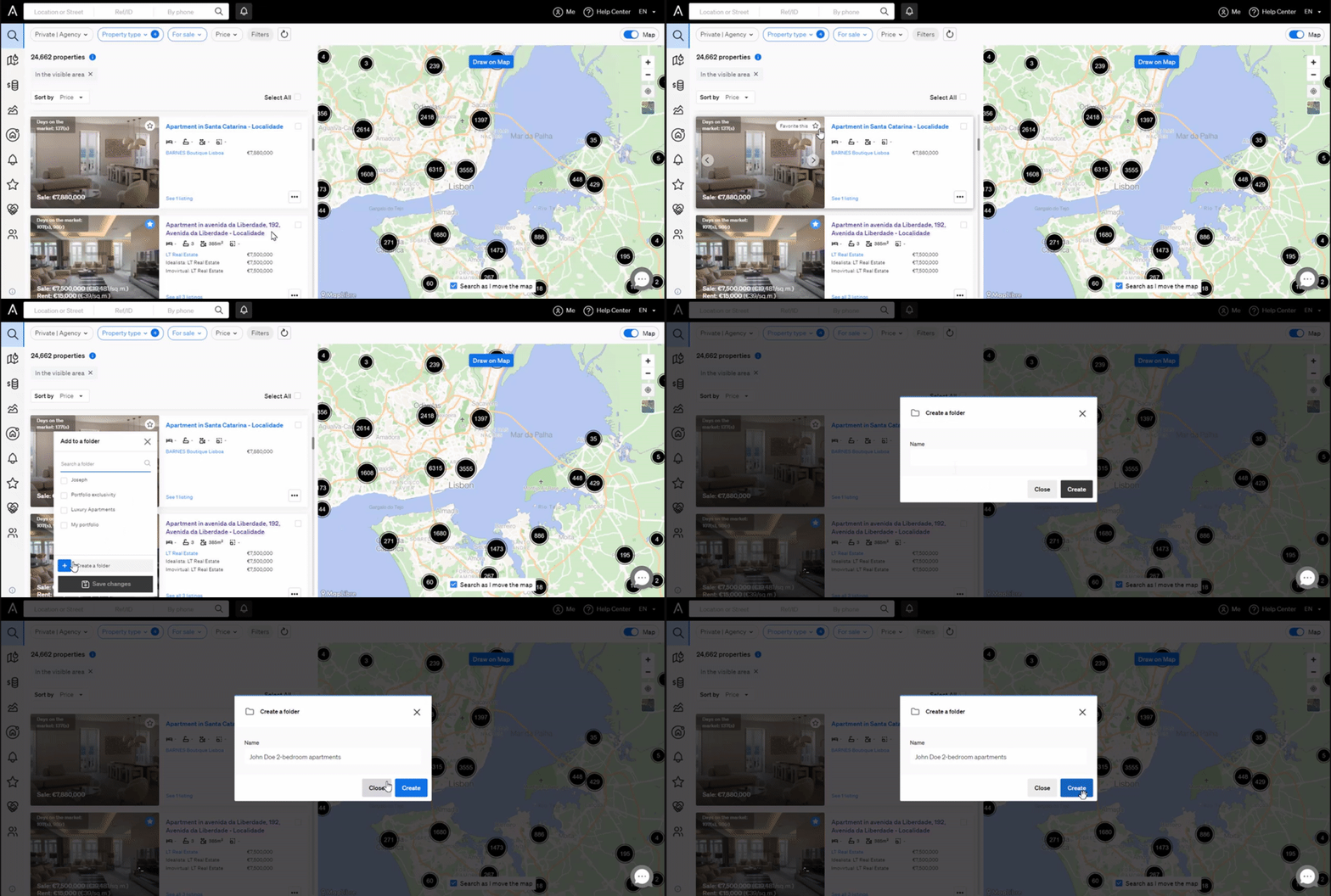
You can also move properties you have already saved into the new folder.
Good to know
- Use folders to separate properties by client, status or any other category that suits your workflow.
- If you need help creating or managing folders, contact support@casafari.com or go to Help Center > Contact Us in the platform.
Last updated: