
Area Insights MCP: property market data for AI assistants
Area Insights MCP is a CASAFARI MCP server at platform.casafari.com/mcp/area-insights that enables AI assistants like Claude or ChatGPT to analyse district-level property markets in plain English. Exposing seven tools, it retrieves price, supply, and activity time series, distributions, heatmaps, and growth measures (CAGR, delta_pct, volatility) from CASAFARI’s deduplicated property graph covering 16 countries (US: entering now, selected states, commercial real estate only, via Claro AI). It connects via browser OAuth 2.1 with no API key to copy, starting with 1,000 free tokens (developers.casafari.com, October 2026).
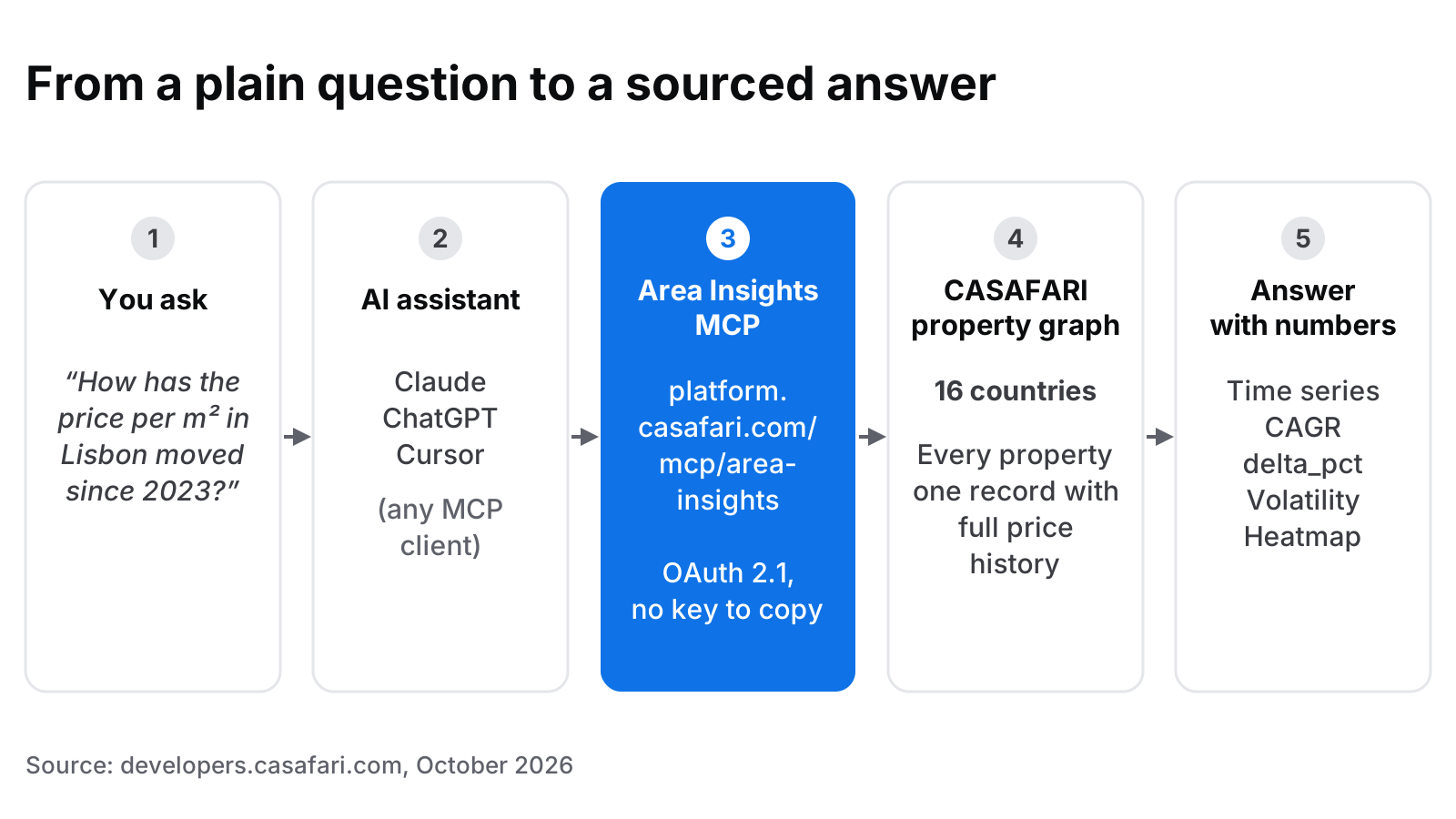
What can an AI assistant answer with Area Insights MCP?
Imagine an investment analyst in London drafting an advisory note on Southern European residential assets. Rather than opening multiple browser tabs, exporting raw listing spreadsheets, and manually cross-referencing district medians, she opens her AI assistant and types a plain prompt: “How has the asking price per square metre for two-bedroom apartments in Lisbon shifted since 2023, and which parishes are showing the strongest momentum?”
Behind the scenes, her assistant queries Area Insights MCP. The server returns clean, structured figures directly from CASAFARI’s property graph. Covering residential and commercial real estate across 16 countries, this property graph consolidates listings into single deduplicated records with complete historical pricing and listing status records (developers.casafari.com, October 2026).
Market questions handled by Area Insights MCP generally fall into three core categories:
- Change over time: Tracking asking prices, active stock, new properties, sales and rentals, and price rises and cuts at weekly, monthly, quarterly or yearly intervals.
- Market composition: Examining price band distributions, bedroom counts, and listing durations.
- Spatial hotspots: Identifying high-performing or emerging districts using granular spatial heatmaps.
Whether asking “What is the average time on market for three-bedroom houses in Madrid’s Chamartín district?” or “Which Berlin neighbourhoods experienced the largest increase in rental supply this quarter?”, professionals receive verified, structured intelligence directly within their conversational workflow.
The seven tools and the question each one answers
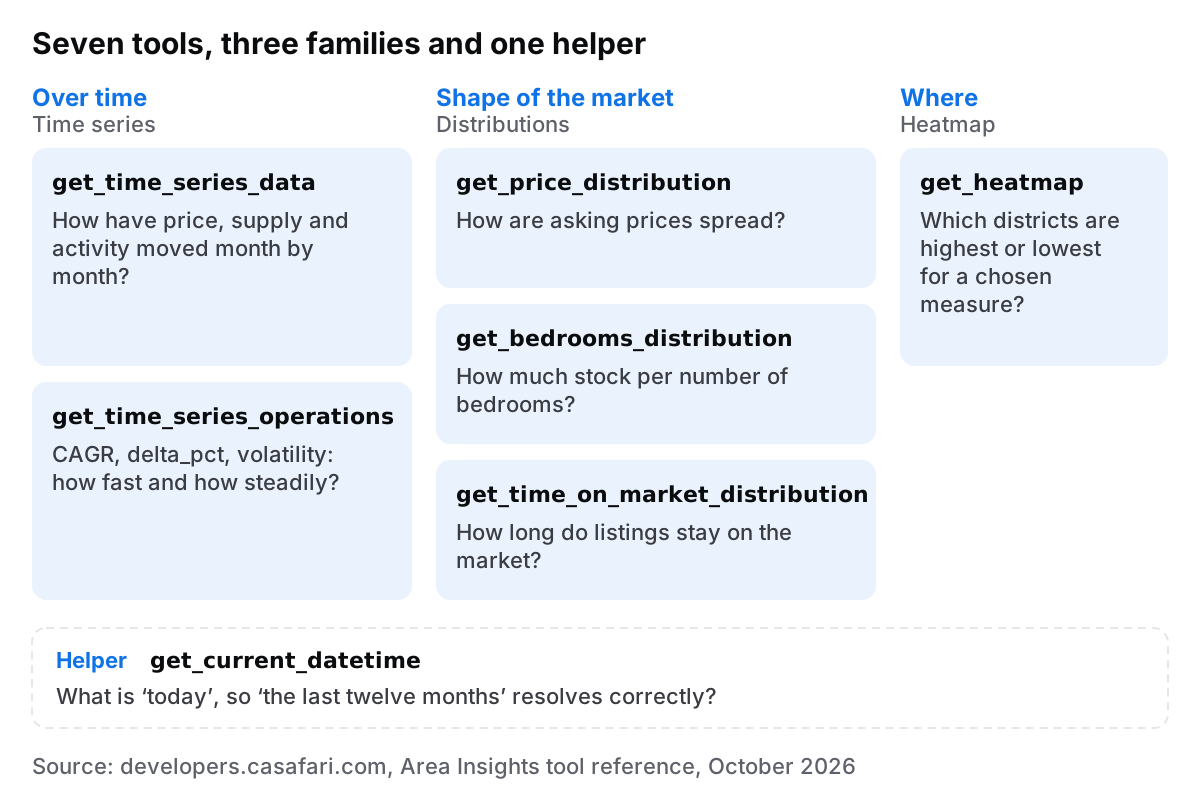
To provide comprehensive analytical coverage without unnecessary complexity, Area Insights MCP provides seven targeted tools. You can consult the Area Insights tool reference on developers.casafari.com for technical documentation, but conceptually each tool addresses a distinct operational query:
get_time_series_data: Returns historical series for pricing, active inventory and market activity at weekly, monthly, quarterly or yearly intervals. It answers: How has the district moved month by month?get_time_series_operations: Performs mathematical evaluations on a series, returning CAGR, delta_pct and volatility metrics (standard deviation and coefficient of variation). It answers: How fast and how smoothly is the market growing?get_price_distribution: Segments active listings across defined price brackets. It answers: What does a typical listing cost in this location?get_bedrooms_distribution: Categorises inventory by unit size. It answers: Is this district dominated by studios or family homes?get_time_on_market_distribution: Returns average days on market by price band. It answers: Is inventory absorbing quickly or stagnating?get_heatmap: Generates spatial metric distributions across child administrative areas. It answers: Where are the specific local hotspots?get_current_datetime: A system helper tool that establishes today’s date. It answers: What is the exact temporal baseline so relative prompts like ‘past 12 months’ resolve accurately?
When identifying specific administrative territories, queries use Location Lookup to map place names to standard location identifiers. Location Lookup calls consume 0 tokens (developers.casafari.com, October 2026).
CAGR, delta_pct and volatility: what the growth measures actually tell you
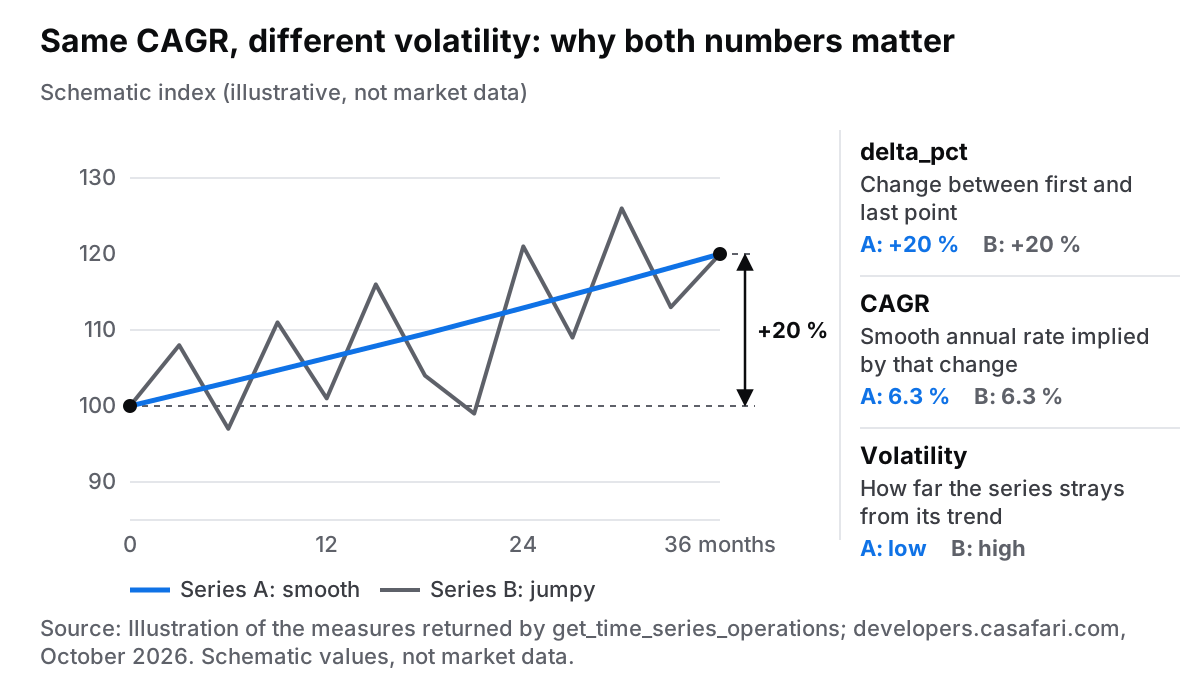
Evaluating real estate market dynamics requires distinguishing between net percentage movement, overall growth trajectory, and underlying variance. The get_time_series_operations tool calculates three mathematical indicators:
- delta_pct: Measures the simple percentage change between the start and end of a given window. It is ideal for straightforward questions like “How much higher are asking prices today compared to last year?”
- CAGR (Compound Annual Growth Rate): Represents the smooth annualised growth rate required for a metric to move from its initial to its final value over multiple years. This standardises performance comparisons across varying holding periods.
- volatility: Quantifies the dispersion of the data points around their mean, as standard deviation (std) and coefficient of variation (cv). High volatility indicates sharper short-term price swings or irregular inventory spikes.
Consider two distinct suburban districts over a three-year period. Both districts show a total price gain of 20%, resulting in identical delta_pct and CAGR metrics. However, District A experienced steady 0.5% monthly increments, whereas District B saw erratic shifts driven by seasonal luxury releases.
An investor seeking predictable capital growth would favour District A. By querying volatility alongside CAGR, an AI assistant highlights these structural risk differences automatically. For a deeper discussion on applying variance metrics to portfolio strategies, read our post on reading price volatility. For user interface details, see the time series tool in the web app.
How do I connect Claude, ChatGPT or Cursor to Area Insights MCP?
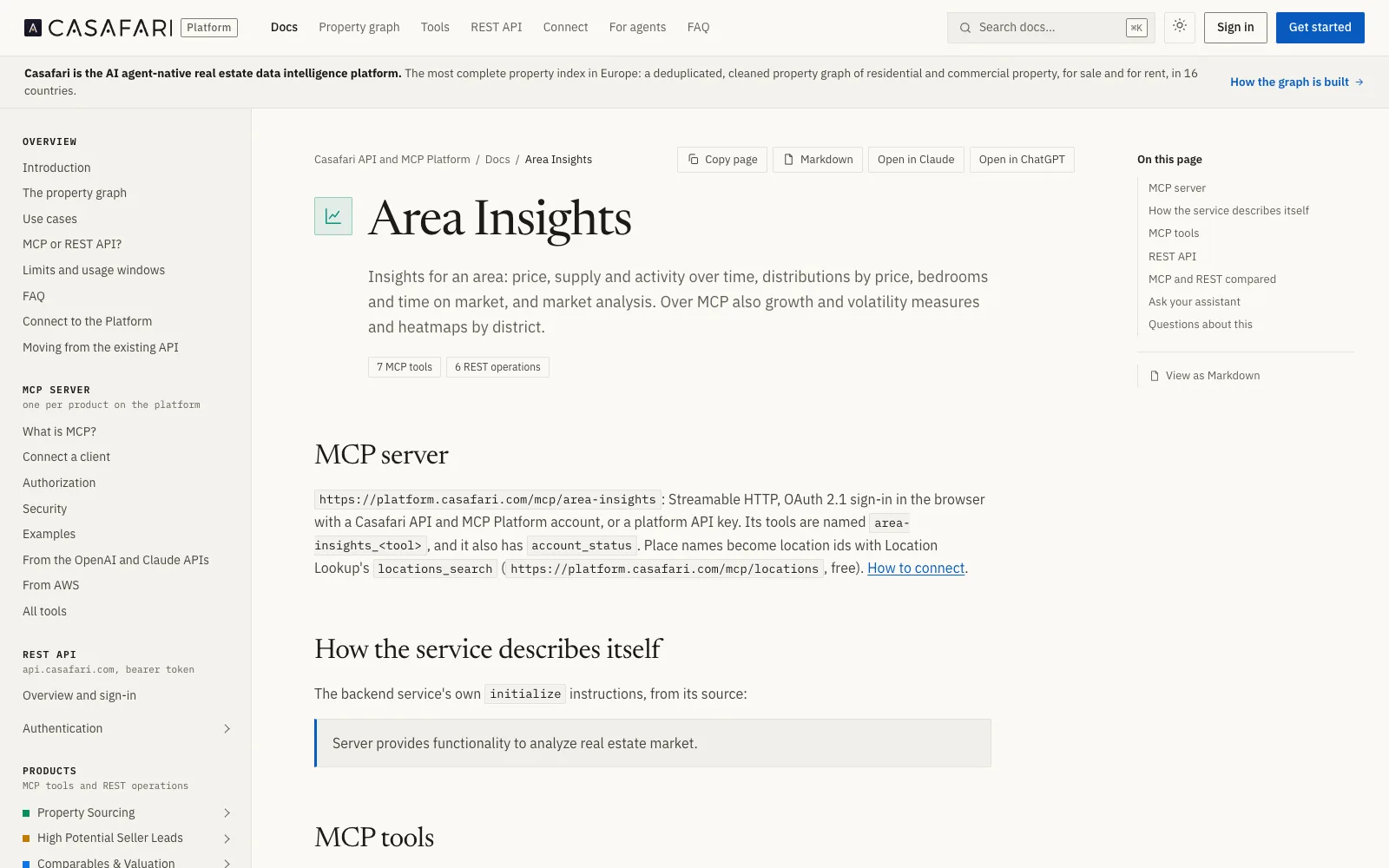
Connecting an AI client to Area Insights MCP requires no code installation or manual secret key copying. The server operates as a public remote endpoint using Streamable HTTP at https://platform.casafari.com/mcp/area-insights (developers.casafari.com, October 2026).
Authorisation relies on OAuth 2.1 as defined in the Model Context Protocol authorisation specification. When you register the endpoint in your client, a browser window opens prompting you to log into CASAFARI. Upon authentication, the client automatically receives and manages its short-lived access token.
Supported client environments include:
- Desktop and Web: Claude (claude.ai, Desktop, mobile custom connector) and ChatGPT (Developer mode custom connector).
- Developer and IDE environments: Cursor, VS Code, Claude Code, Codex CLI, Gemini CLI, Devin Desktop, Visual Studio, Zed, Cline, JetBrains Junie, Kiro, Warp, and goose.
First-time sign-ins automatically create an account on the Free tier without requiring credit card entry. Step-by-step connection instructions are available in the connection guide on developers.casafari.com. The public casafari/casafari-mcp repository on GitHub also holds a Claude Code plugin with skills, a Gemini CLI extension and code samples for connecting the servers.
What does it cost in tokens?
Usage across all CASAFARI MCP servers is metered in tokens. Account tiers are structured as follows (developers.casafari.com, October 2026):
- Free plan: Includes 1,000 tokens valid for 30 days upon registration, with no credit card required.
- Agent plan: EUR 49 per month billed annually, or EUR 70 month to month (ex VAT).
- Custom plan: By contract, for higher volume.
- Prepaid credits: Additional token top-ups can be purchased as needed.
Calls made to resolve geographic boundaries via Location Lookup cost 0 tokens. For complete pricing terms, review plans and token pricing on the developer FAQ.
Where Area Insights MCP fits in your workflow
Area Insights MCP accesses the exact same deduplicated data foundation that powers the Area Insights product page on casafari.com. While web interface features such as what the heatmap tool shows serve visual exploration, the MCP endpoint brings structured intelligence directly into custom writing and reporting workflows.
If you want to review typical prompt formulations, explore prompts estate agents already use with ChatGPT. For developers looking to generate automated PDF market briefings, see the local market report use case on developers.casafari.com.
To inspect all available agent tools across our ecosystem—including valuation tools—visit CASAFARI MCP, property data for AI agents. To get started, sign in to the CASAFARI platform and try the server today.
Frequently asked questions
What is Area Insights MCP?
Area Insights MCP is a dedicated server (https://platform.casafari.com/mcp/area-insights) that provides AI assistants with seven tools for district-level real estate analysis. It retrieves historical price trends, supply levels, time on market, property distributions, heatmaps, and calculated growth indicators directly from CASAFARI’s property graph. Covering residential and commercial markets across 16 countries, it allows professionals to run grounded spatial queries in plain English (developers.casafari.com, October 2026).
Do I need an API key to use the Casafari MCP server with Claude or ChatGPT?
No, you do not need to paste or manage an API key. Connection relies on OAuth 2.1 authentication in your browser, allowing your AI assistant to manage its own access token seamlessly. Your account is automatically configured on the Free plan without requiring a credit card upon your first browser sign-in (developers.casafari.com, October 2026).
How much does Area Insights MCP cost?
Usage is measured in tokens. The Free plan includes 1,000 tokens for 30 days without entering payment details, while the Agent plan costs EUR 49 per month billed annually or EUR 70 month-to-month (ex VAT). Additional consumption can be covered with prepaid credits, and resolving place names via Location Lookup costs 0 tokens (developers.casafari.com, October 2026).
What is the difference between CAGR, delta_pct and volatility in a property price series?
delta_pct measures the total percentage change between two specific points in time, providing a simple snapshot of overall movement. Compound Annual Growth Rate (CAGR) calculates the annualised rate required to achieve that same overall gain, enabling fair comparisons across unequal timeframes. Volatility quantifies how significantly monthly prices fluctuate around the underlying trend, highlighting structural market risk that simple growth figures might obscure.
Which cities and countries can I analyse with Area Insights MCP?
Area Insights MCP draws from CASAFARI’s deduplicated property graph, which covers residential and commercial sales and rentals across 16 countries, including major metropolitan markets such as Lisbon, Madrid, and Berlin. You can verify whether a specific territory is supported by checking the countries where CASAFARI data is available. Place names can be identified seamlessly before executing market queries.