
How do I set my commission rules for shared deals?
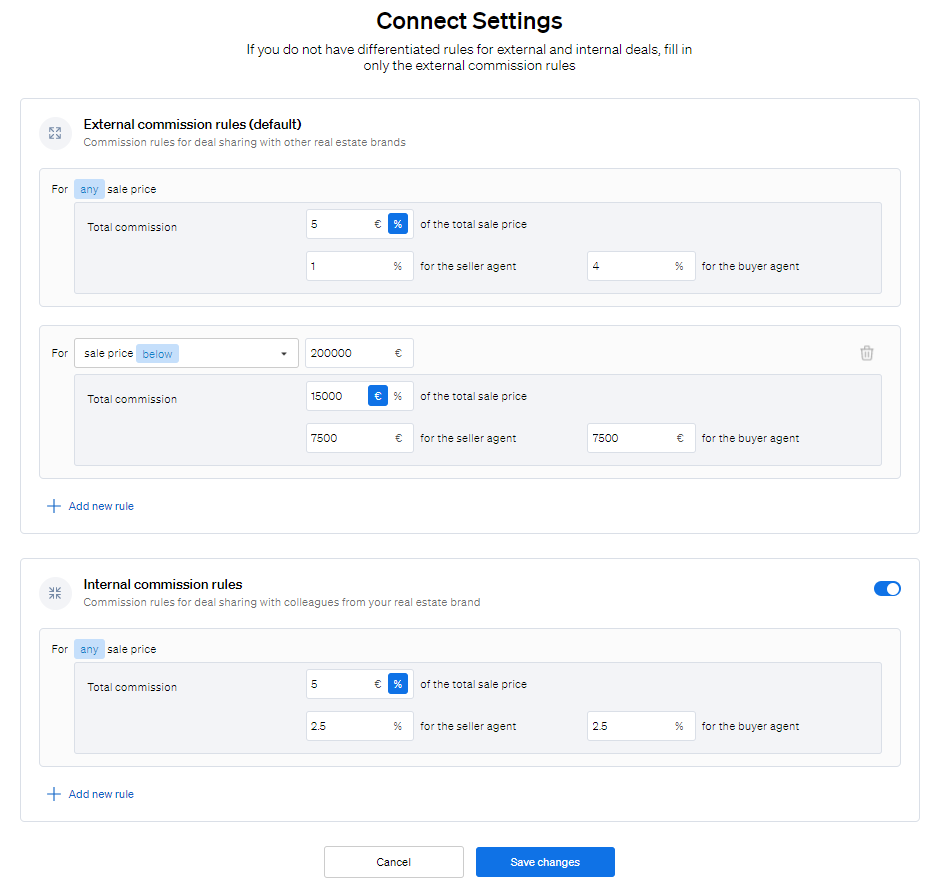
In CASAFARI, click Me at the top of the menu, select Edit Connect Settings, enter the commission percentage you want for shared deals in the commission rules section, and click Save.
Commission rules in CASAFARI Connect set the commission that applies to the deals you share.
- Log in to your CASAFARI account at https://www.casafari.com/login.
- Click Me at the top of the menu.
- Select Edit Connect Settings from the dropdown menu. The CASAFARI Connect settings page opens.
- In the commission rules section, enter the commission percentage you want for shared deals.
- Click Save to apply your changes.
Good to know
- Default commission rules are applied automatically when your company joins CASAFARI Connect.
- The administrator of the company account can change the commission rules at any time.
- You can set different commission rules for deals shared within your team or franchise (internal) and deals shared with other agencies (external).
- You can add further commission rules for properties priced from and up to a certain amount in €.
- If you want different commission values for a specific request, you can negotiate each deal individually when you receive the request.
If you need help, contact support@casafari.com or go to Help Center > Contact Us in the platform.
Last updated: