
How do I share a property with a SmartLink?
Open the property page, click Export & Share at the top, select Share SmartLink and send it via WhatsApp or Facebook, or copy the link to paste anywhere. To share several properties at once, select them in your search results and use the SmartLink button above the list.
A SmartLink is a live link that shows your clients and colleagues the properties you have selected in a clean, client-friendly format, without overwhelming branding or platform distractions. It updates automatically with the latest property data.
Share a single property
- Log in to your CASAFARI account at https://www.casafari.com/login.
- Go to Property Search and click a property to open its Property Page.
- Click Export & Share at the top right of the page.
- Select Share SmartLink.
- Choose how to send it: via WhatsApp, via Facebook, or copy the link and paste it anywhere you prefer.
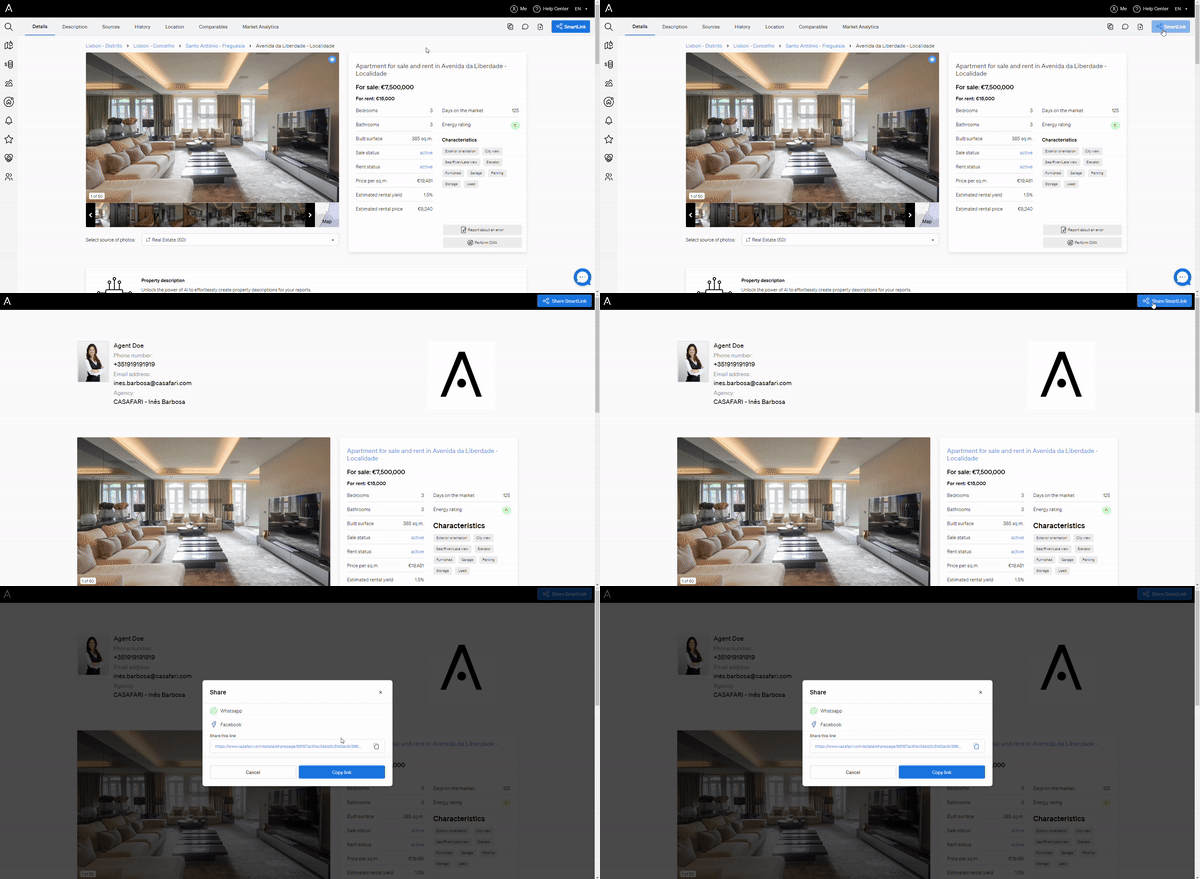
If you prefer a document, click the PDF icon on the property page to generate a PDF brochure. You can save it and share it with your client or colleagues whenever you like.
Customise the title and content before sharing
You can choose what the SmartLink for a property shows:
- To change the title, click the pencil icon beside the page title, type the new title and click save.
- To choose the content, click the pencil icon beside the Export & Share button.
- In the popup, scroll down and turn content blocks on or off.
- Click Create SmartLink.
Alternatively, scroll through the property page and use the toggle on each content block to decide in advance what is included. When you are done, click Export & Share at the top of the page to create your SmartLink.
Share several properties at once
- Run a property search and select the properties you want to share from your results list.
- Click the SmartLink button above the results.
- Select Share SmartLink.
- Send it via WhatsApp or Facebook, or copy and paste the link.
To share a document instead, click Save PDF to create a PDF brochure with all selected properties and share it with your clients or colleagues later.
Good to know
- SmartLinks are live: they always show the latest property data.
- You can see whether and when clients viewed the properties you sent.
- Clients can leave comments on shared properties, so you can collect their feedback directly.
- SmartLinks work well for sending hand-picked listings to a buyer, following up after a meeting or client call, sending personalised suggestions during property searches, or collaborating with colleagues on a set of properties.
Need help? Contact support@casafari.com, or go to Help Center > Contact Us inside the platform.
Last updated: