
Location Lookup over MCP and REST: resolve the place first, for 0 tokens
Location Lookup is CASAFARI’s free dictionary of places. Give it a city or district name such as “Kensington” or “Chiado”, and it returns the precise location_id that Area Insights and Property Sourcing require. It costs 0 tokens, runs over MCP at https://platform.casafari.com/mcp/locations or over REST, and should always be the first tool call an AI agent or data pipeline makes.
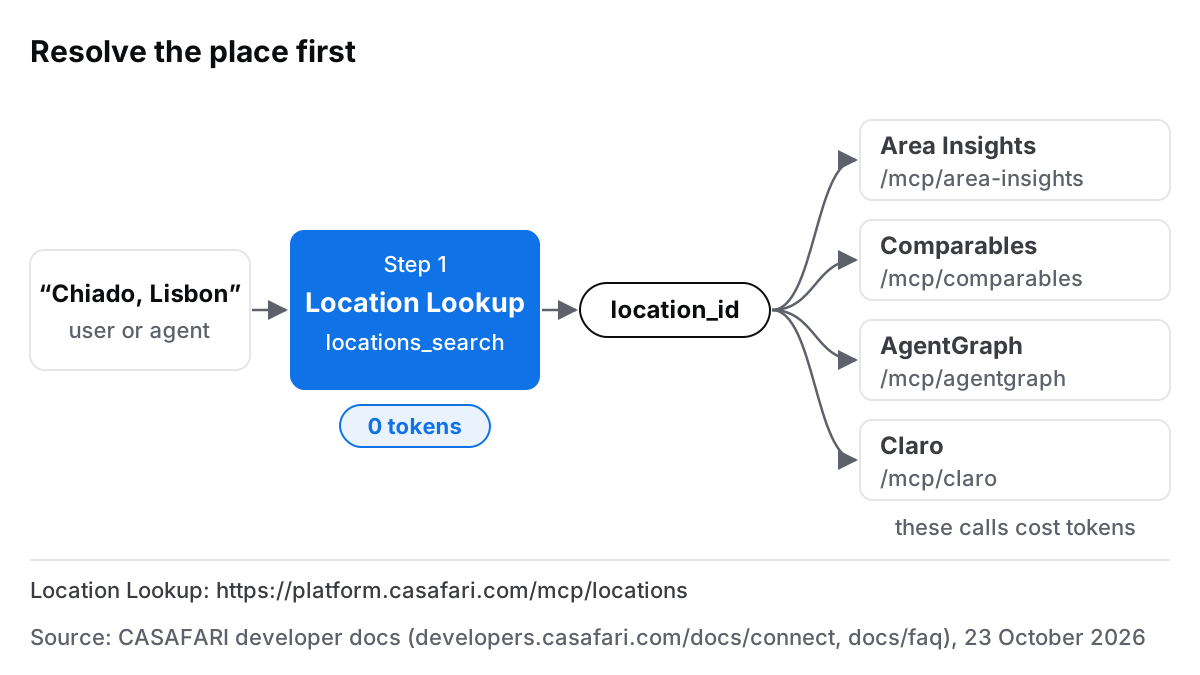
What Location Lookup does, in one sentence
Location Lookup is a dedicated CASAFARI product designed to convert standard geographical queries into standard identifiers across our property graph. According to the CASAFARI property graph documentation (23 October 2026), our database contains deduplicated, cleaned residential and commercial records for sale and rent across 16 countries (US: entering now, selected states, commercial real estate only, via Claro AI), giving each property a single unified history.
To query this data by area without ambiguity, Area Insights and Property Sourcing expect a structured key called a location_id. Location Lookup exposes an MCP tool called locations_search. When an assistant or application invokes locations_search, it resolves free-text geographical inputs into structured location entities without consuming any tokens.
Why an agent should resolve the place before anything else
Consider a user asking an AI assistant: “What do two-bedroom flats rent for in Chiado?” If the assistant attempts to query market metrics by passing raw text directly to valuation tools, it risks making educated guesses or calling endpoints with invalid parameters. This can result in inaccurate reports or wasted calls.
Place names are inherently ambiguous. Multiple municipalities or neighbouring districts across different European regions often share identical names. Resolving the place name first creates a single, deterministic location_id that remains stable across every subsequent query.
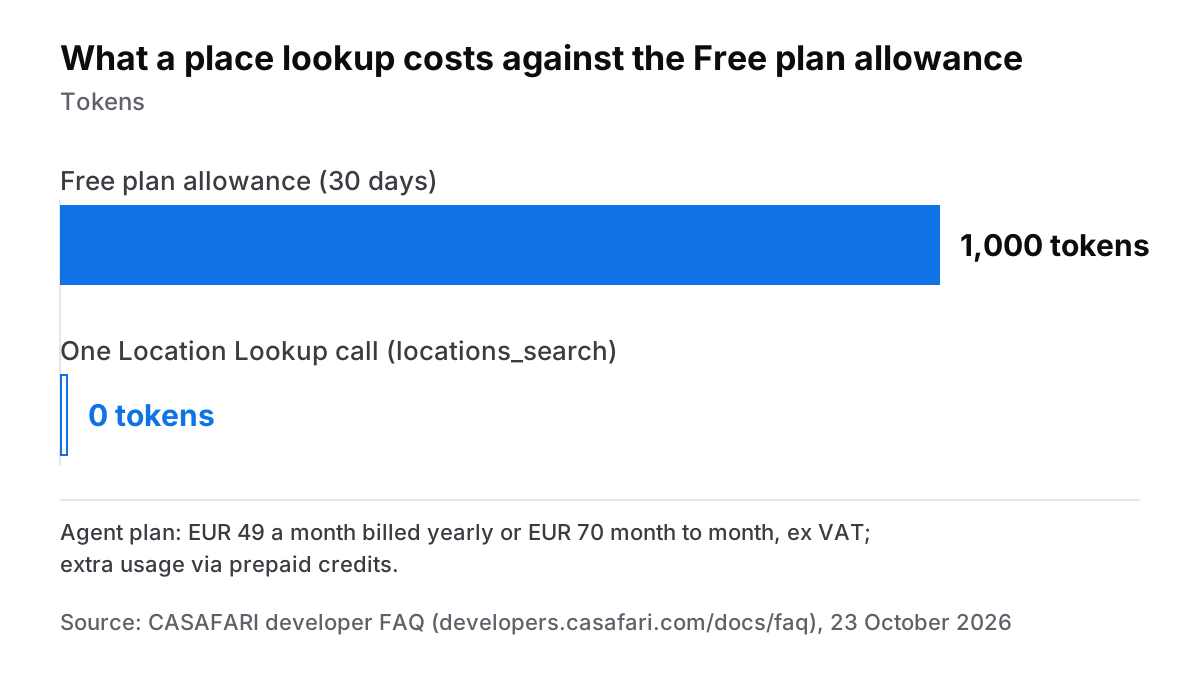
There is also a strong economic incentive to follow this sequence. As detailed in the CASAFARI developer FAQ (23 October 2026), place lookups cost 0 tokens on every tier, including the Free plan, which provides 1,000 tokens for 30 days without requiring a payment card. Paid subscriptions, such as the Agent plan at EUR 49 per month billed annually or EUR 70 month-to-month (ex VAT), spend tokens only when fetching actual market statistics or property details. Resolving the location first ensures that spent tokens return exact data for the intended market on the first attempt.
If you ever encounter difficulties finding a specific municipality or region, consult our guidance on what to do if a location cannot be found. To learn how our system links addresses to coordinates, read about how CASAFARI determines a property’s location.
How to connect the Location Lookup MCP server
Connecting Location Lookup to your AI toolchain requires adding its dedicated endpoint as a Model Context Protocol (MCP) server. As outlined in the CASAFARI Connect guide (23 October 2026), the Location Lookup server resides at https://platform.casafari.com/mcp/locations.
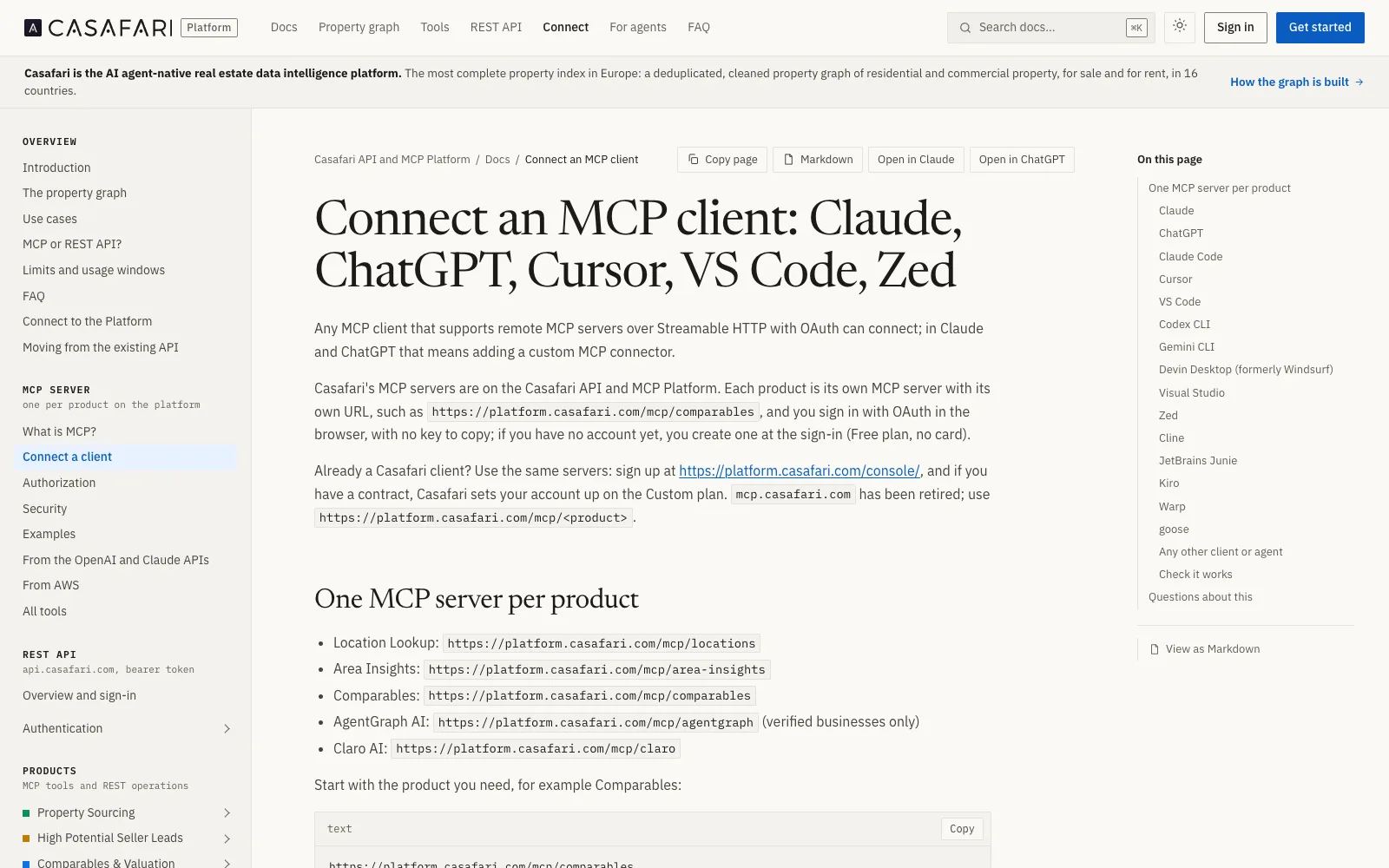
The connection relies on standard Streamable HTTP transport and handles user authentication through OAuth 2.1 authorisation. During setup, your client opens a browser window to grant permission; no static API keys need to be copied. Your initial sign-in automatically sets up your workspace on the Free plan.
This setup pattern applies to all supported clients—including Claude Desktop, ChatGPT in Developer mode, Cursor, VS Code, Zed, and custom agent implementations using the public casafari-mcp GitHub repository. Each CASAFARI product operates its own dedicated server URL using the same pattern, such as /mcp/area-insights or /mcp/comparables.
Using locations_search: what you send and what comes back
The locations_search tool accepts a place name or postcode. In response, it returns the matching locations, each with its name and location_id.
When instructing AI agents, state in their prompt or system guidelines that they must invoke locations_search before requesting property valuations or market trends. If several candidate locations come back for a broad term, the agent can present the options to the user before proceeding.
Once the correct candidate is identified, the agent passes the retrieved location_id directly into Area Insights or Property Sourcing, ensuring consistent results.
Location Lookup over REST, for pipelines without an agent
If you are building background processes, CRM synchronisation tools, or automated data integrations rather than interactive AI assistants, you can call Location Lookup over REST: GET https://platform.casafari.com/v1/locations/search searches locations by name or postcode, authenticated with a platform API key (cf_sk_...) sent as a bearer token. For an introduction to building with property endpoints, read our overview of what a real estate API is and does.
The underlying dictionary and location keys remain identical across both REST and MCP interfaces. An ID resolved through an interactive assistant session can be reused in server-side scripts or stored directly within your database. Developers can explore full endpoint descriptions on the CASAFARI Property Data APIs product page and review complete specifications in the CASAFARI REST API reference.
Where the id goes next: Area Insights, Comparables, AgentGraph, Claro
Once you have resolved a location_id, it is the key that Area Insights and Property Sourcing expect; the other products take a place in their own way:
- Area Insights: Takes up to ten
location_idsand returns price, supply and activity over time, distributions by price, bedrooms and time on market, and heatmaps by district. Learn more in the Area Insights documentation. - Comparables: Matches properties on the market, past sales and rentals and registry records around a point, an address or a Spanish cadastral reference rather than a
location_id. Review the Comparables documentation. - AgentGraph: Finds the agencies and agents in Germany worth partnering with; it has its own
agentgraph_find_locationtool for German cities, districts and states. Details are in the AgentGraph documentation. - Claro: Searches commercial premises in Spain and Germany, and commercial plots in Germany, taking cities and districts by name in plain words. See the Claro documentation.
To start integrating these capabilities into your workflows, visit our main page on CASAFARI MCP for AI agents or sign in to platform.casafari.com to claim your 1,000 free tokens.
Frequently asked questions
What is a Casafari location_id?
A location_id is CASAFARI’s canonical identifier for a specific geographic area, such as a city or district, within its property graph. Area Insights and Property Sourcing require this exact identifier instead of free-text names to eliminate geographical ambiguity. Location Lookup resolves standard location names into this required key.
How do I connect the Casafari Location Lookup MCP server to Claude or Cursor?
Add https://platform.casafari.com/mcp/locations as a custom MCP server in your client using the Streamable HTTP transport. When prompted, complete the browser-based OAuth 2.1 authentication flow to sign in. First-time users are automatically assigned to the Free plan without needing to provide payment details.
Does Location Lookup cost tokens?
No, Location Lookup calls cost 0 tokens on all subscription tiers, including the Free plan. You can search and resolve location names repeatedly without consuming any tokens. Tokens are consumed only when calling data endpoints such as Area Insights or Comparables.
Why does my agent need to resolve a location before calling Area Insights or Comparables?
Area Insights runs its market queries on a location_id, and Property Sourcing searches by location_ids too; Comparables works around a point, an address or a Spanish cadastral reference instead. Passing raw place names where an id is expected causes errors or metrics for the wrong region. Resolving the place name first using the free Location Lookup tool ensures accurate and cost-effective responses.
Can I use Location Lookup over REST without MCP?
Yes, Location Lookup is available via traditional REST API endpoints for software integrations, backend processing, and CRM platforms. The resulting location_id values are identical across both REST and MCP interfaces. Full request specifications are available in the CASAFARI API developer documentation.