
Connect CASAFARI to ChatGPT and Claude in five minutes
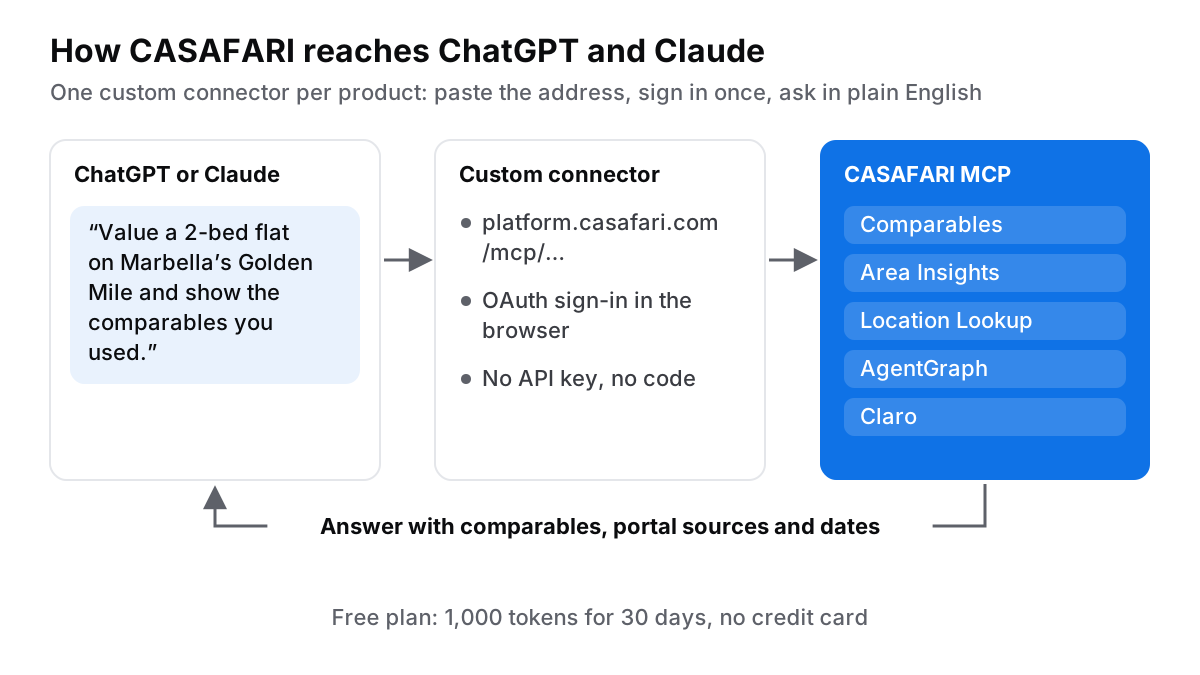
You can connect CASAFARI’s property data to ChatGPT or Claude in five minutes without writing a single line of code. By adding a custom connector using an MCP server address—such as https://platform.casafari.com/mcp/comparables—you sign in once in your browser via OAuth and ask for property valuations, market trends, or location details in plain English. The Free plan includes 1,000 tokens valid for 30 days without requiring a credit card.
Why the prompt was never the problem
Imagine a Tuesday evening in Marbella. A London buyer sends a WhatsApp asking whether €850,000 is a fair price for a two-bedroom flat on the Golden Mile. You copy the listing text into Claude or ChatGPT, hoping for a quick sanity check. Seconds later, the chat returns a beautifully composed, persuasive paragraph. Yet it contains no real comparable properties, no portal links, and no dates.
Prompts help with words, but valuation and market study require real property data that generative AI models simply do not possess natively. In fast-moving markets, relying on static training data is risky. For example, in Portugal, the House Price Index rose 16.5% year on year in Q2 2026 while transaction volumes fell 6.4%, according to INE’s House Price Index release for Q2 2026. A model trained months ago cannot accurately price a flat under those dynamic conditions.
CASAFARI is a European real estate data platform whose property graph covers 16 countries (US: entering now, selected states, commercial real estate only, via Claro AI), as detailed in the llms.txt specification on developers.casafari.com (October 2026). By connecting CASAFARI MCP, property data for AI agents to your existing chat tools, you bring verified market numbers directly into your daily conversation workflow. While our ChatGPT prompts for estate agents help format your client communications, adding real live data grounds every conversation in verified facts.
What is an MCP connector in estate-agent terms?
Model Context Protocol (MCP) is an open standard that allows an AI assistant to fetch information safely from an external platform. Think of an MCP connector like adding a wireless printer to your office laptop: you enter the printer’s address once, authenticate your account, and your laptop can send documents to print whenever needed.
CASAFARI provides five specialized MCP servers, each dedicated to a distinct task:
- Comparables: Delivers AI property valuations backed by active listings and sold historical data.
- Area Insights: Provides median asking prices per square metre, stock changes, and price trends by location.
- Location Lookup: Resolves informal location names into precise geographic location IDs.
- AgentGraph: Queries estate agencies and agents across markets.
- Claro: Offers location intelligence for commercial shops, offices, and plots.
Each product has its own dedicated address, such as https://platform.casafari.com/mcp/comparables, https://platform.casafari.com/mcp/area-insights, and https://platform.casafari.com/mcp/locations. You simply copy the web address of the tool you need and paste it into your chat app.
How do I add CASAFARI to Claude?
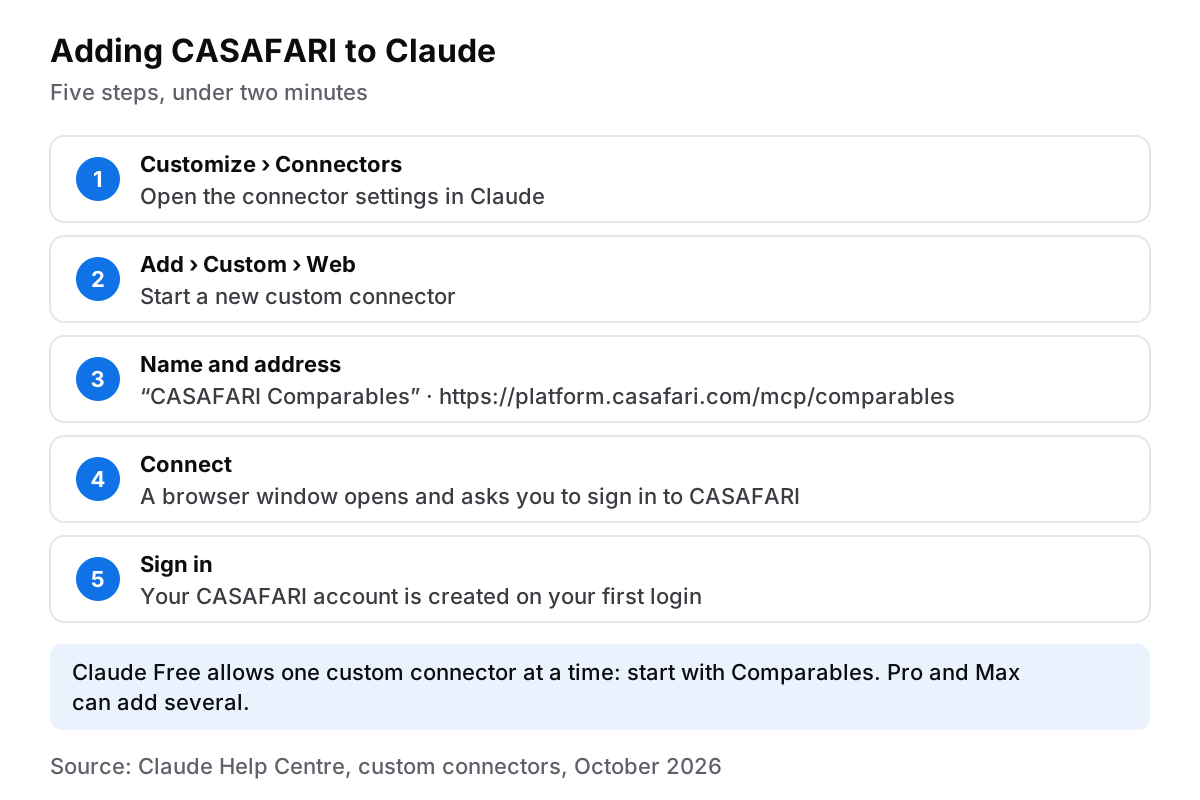
Adding a custom connector to Claude takes less than two minutes. Follow these simple steps, as outlined in Claude’s guide to custom connectors (October 2026):
- Go to Customize > Connectors in your Claude interface.
- Click Add and select Custom > Web.
- Name your connector (for example, “CASAFARI Comparables”) and paste
https://platform.casafari.com/mcp/comparables. - Click Connect. A browser window will open asking you to sign in to CASAFARI.
- Complete the sign-in. Your account is created automatically on your first login, as explained in how OAuth sign-in works on developers.casafari.com (in English).
Once connected, Claude can query CASAFARI data directly. Note that the Claude Free plan is limited to one custom connector at a time, so individual users on Free plans should start with Comparables; users on Claude Pro or Max can add multiple connectors, while Team and Enterprise accounts manage connectors under Organization settings.
How do I add CASAFARI to ChatGPT?
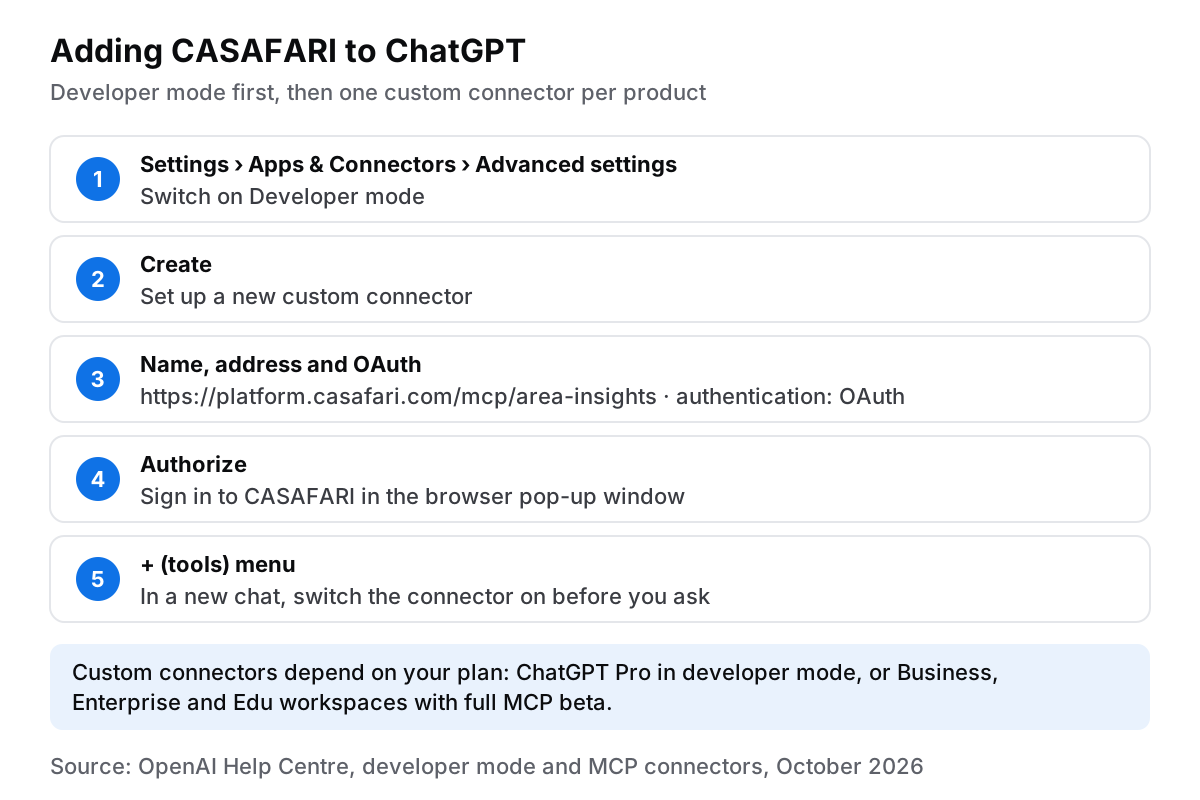
Connecting CASAFARI to ChatGPT requires enabling developer mode, as described in OpenAI’s note on developer mode and MCP connectors in ChatGPT (October 2026):
- Open Settings > Apps & Connectors > Advanced settings and switch on Developer mode.
- Click Create to set up a new custom connector.
- Enter a name, paste the MCP address (such as
https://platform.casafari.com/mcp/area-insights), select OAuth authentication, and click Create. - Authorize the connection in the browser pop-up window.
- In a new chat session, open the + (tools) menu to activate the connector before asking your question.
Where your ChatGPT plan allows custom connectors—such as ChatGPT Pro in developer mode or Business, Enterprise, and Edu workspaces with full MCP beta enabled—you can fetch live property insights instantly. For additional help, consult the ChatGPT connection FAQ on the developer hub (in English).
Question 1: what is this flat worth?
Returning to our Marbella example, you can now ask your assistant a clear question in plain English: “Value a 2-bedroom, 95 m2 flat with terrace and sea view in Marbella Golden Mile, second floor, built 2005, and show the comparables you used with their sources.”
Instead of generic text, your assistant calls the Comparables server and returns an estimated market valuation range alongside concrete comparable properties, portal source names, and listing dates. You can immediately forward these cited market sources to your London client.
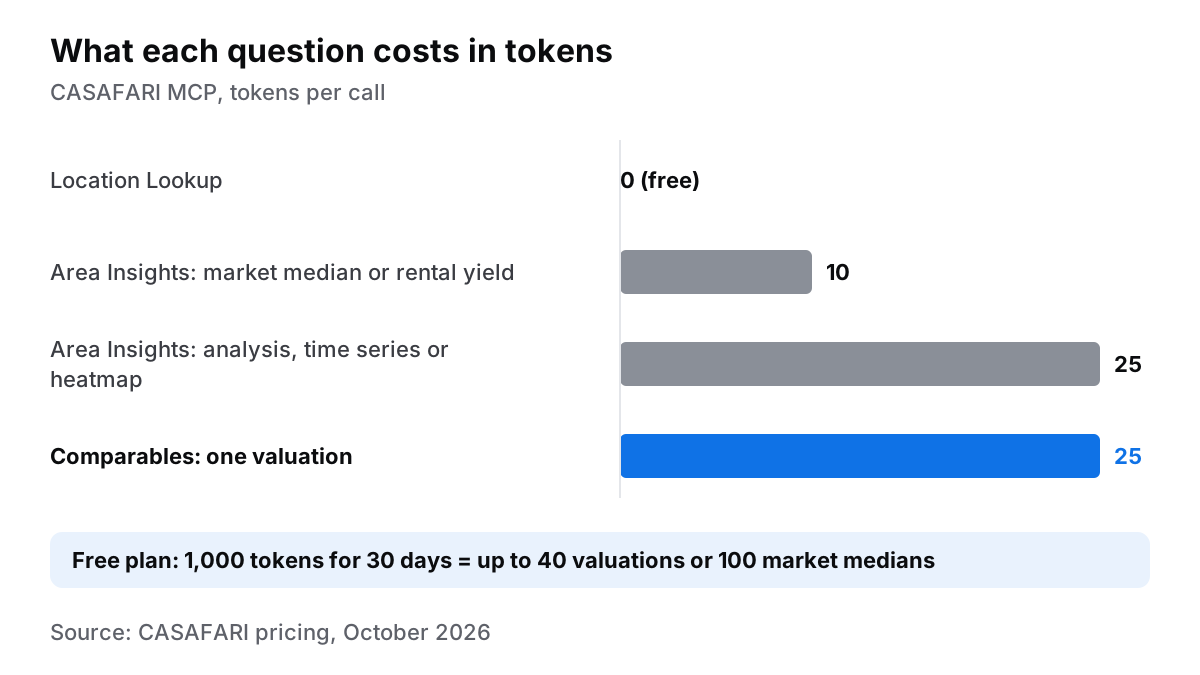
Each Comparables valuation request consumes 25 tokens from your allowance. On CASAFARI’s Free plan, which offers 1,000 tokens for 30 days without requiring a payment card (CASAFARI pricing, October 2026), you can run up to 40 property valuations. Learn more about CASAFARI’s Valuation & Market Study and read how CASAFARI calculates the estimated value in our knowledge base. For complete technical parameters, see the Comparables documentation (in English).
Question 2: is the area going up or down?
Next, your client might ask about market trajectory in another prime destination. You can type: “Show the monthly median asking price per m2 for flats in Parque das Nações, Lisboa, over the last 12 months, and say whether it is rising.”
Your assistant uses Location Lookup (free of charge) to identify the district boundaries, then queries Area Insights, prices and trends by area. The chat returns the monthly historical trend with exact numbers and percentage variations.
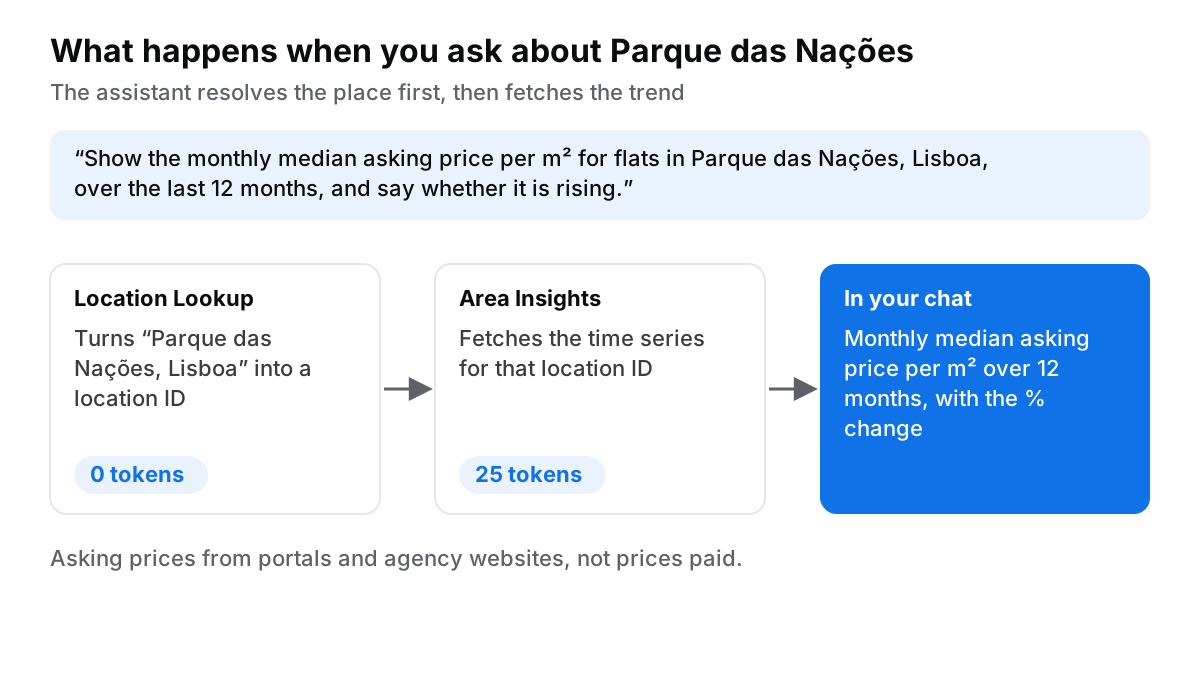
While national metrics show strong macro growth—such as Portugal’s national House Price Index rising 16.5% year on year in Q2 2026 according to INE Portugal—hyper-local trends provide the precise clarity international investors need. Area Insights analyses, time series and heatmaps cost 25 tokens; a market median or rental yield costs 10 tokens. Review full schema details in the Area Insights documentation (in English).
Question 3: which location do you mean?
Imprecise geographic queries often lead to inaccurate pricing. Asking about “Marbella” in general produces different results than specifying “Nueva Andalucía” or the “Golden Mile”. Similarly, “Cascais” differs from the broader administrative unit “Cascais e Estoril”.
To avoid ambiguity, you can ask: “Which locations does CASAFARI have for Marbella, and which one is the Golden Mile?”
The assistant executes a Location Lookup query, returning official location names along with their exact geographic identifiers. Because Location Lookup calls cost 0 tokens, making it a habit to resolve location IDs first ensures all subsequent valuation calls use correct boundaries.
What does it cost after the free 30 days?
Every new account starts on the Free plan with 1,000 tokens valid for 30 days and no credit card required (CASAFARI pricing, October 2026).
When you require higher monthly volume, the Agent plan costs €49 per month billed annually (€588 per year ex VAT) or €70 month-to-month ex VAT. The Agent plan provides 1,000 tokens per rolling 3-hour window and up to 4,000 tokens per 7-day rolling period, enabling up to 160 Comparables valuations every week.
To view account usage or adjust your plan, sign in to the CASAFARI platform and refer to our billing and subscription help guide.
Where this goes next: data across your workflow
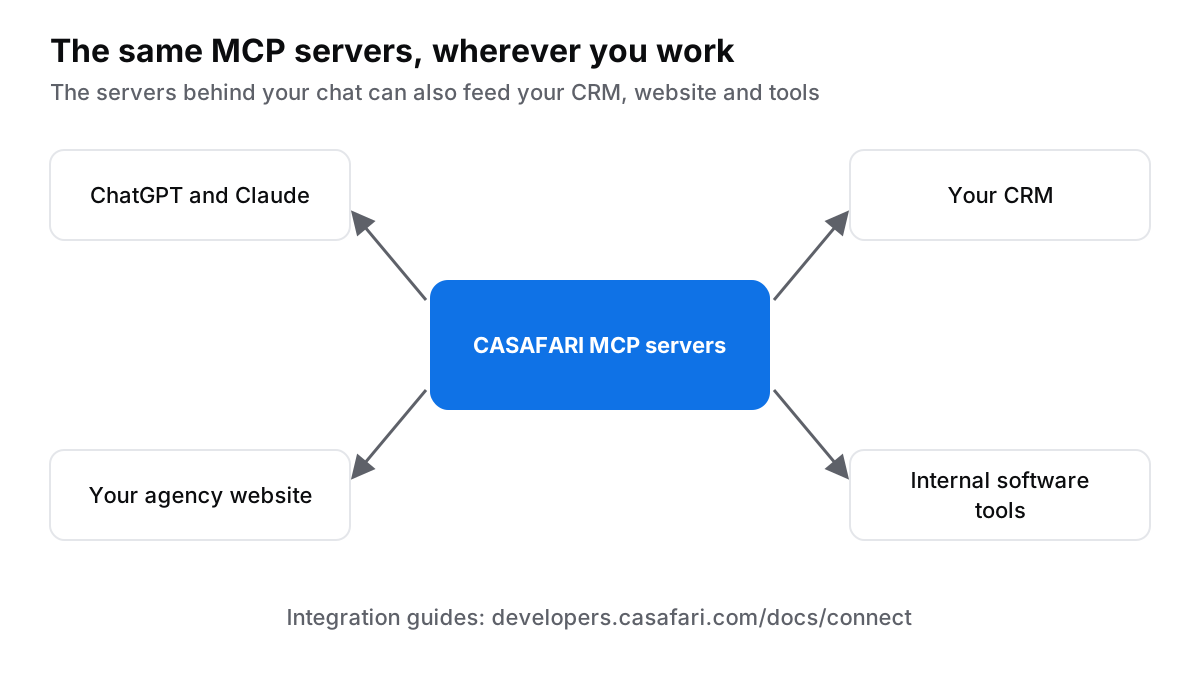
Connecting ChatGPT or Claude to CASAFARI MCP gives you instant access to reliable property figures directly within your conversational tools. The same underlying MCP servers can also supply real-time market intelligence to your CRM, agency website, or internal software tools.
If you or your development team want to explore custom integrations, visit the step-by-step connect guide on developers.casafari.com (in English) and check the Claude connection FAQ on the developer hub (in English). You can also explore the countries where CASAFARI data is available across 16 markets.
Frequently asked questions
Can ChatGPT value a property on its own?
No. Without a data connector, ChatGPT and Claude write from static training data and cannot access current active listings or historical sold prices. When connected to CASAFARI’s Comparables connector, the assistant generates valuations backed by real market comparables, complete with portal sources and dates. Each Comparables call consumes 25 tokens, and new accounts receive 1,000 free tokens valid for 30 days with no payment card required (CASAFARI pricing, October 2026).
Which ChatGPT plan do I need to add a custom connector?
According to the OpenAI Help Centre (October 2026), adding custom MCP connectors requires enabling developer mode under Settings > Apps & Connectors > Advanced settings. ChatGPT Pro users can connect read-only MCP servers in developer mode, while Business, Enterprise, and Edu workspace accounts have access to full MCP functionality in beta once configured by an administrator. Where your ChatGPT plan supports custom connectors, you can connect CASAFARI in minutes.
Do I need an API key to connect CASAFARI to Claude?
No API key is required. Authentication uses OAuth 2.1 in the browser: simply paste the CASAFARI MCP address into Claude, click Connect, and sign in to your CASAFARI account, which is created automatically during your first login (developers.casafari.com, October 2026). Please note that the free Claude plan permits one custom connector at a time (Claude Help Centre, October 2026).
What does a token cost and how far does the free plan go?
Tokens measure what each CASAFARI MCP query costs. Location Lookup calls cost 0 tokens; an Area Insights market median or rental yield costs 10 tokens; Area Insights analyses, time series or heatmaps cost 25 tokens; and a Comparables valuation costs 25 tokens. The Free plan provides 1,000 tokens for 30 days without a credit card, allowing up to 40 full property valuations or 100 market median queries (CASAFARI pricing, October 2026).
Which countries does CASAFARI’s data cover for these questions?
The property graph powering CASAFARI MCP covers 16 countries across Europe, the UAE and the United States (US: entering now, selected states, commercial real estate only, via Claro AI), as documented on developers.casafari.com (October 2026). For the valuations and price trends in this guide, that means the European markets and the UAE, including the prime international markets where UK and international buyers concentrate: Portugal, Spain, Italy and France.