
Casafari MCP in Claude, ChatGPT and Gemini CLI: how to ask an AI assistant for European property data
CASAFARI publishes dedicated Model Context Protocol (MCP) servers at https://platform.casafari.com/mcp/<product> for five of its property data products. Any compatible client—including Claude, ChatGPT, Gemini CLI, Claude Code, and Cursor—can authenticate via OAuth 2.1 in a browser to query Area Insights, Comparables, AgentGraph, and Claro across a property graph covering 16 countries (US: entering now, selected states, commercial real estate only, via Claro AI). The Free plan includes 1,000 usage tokens for 30 days without requiring a payment card.
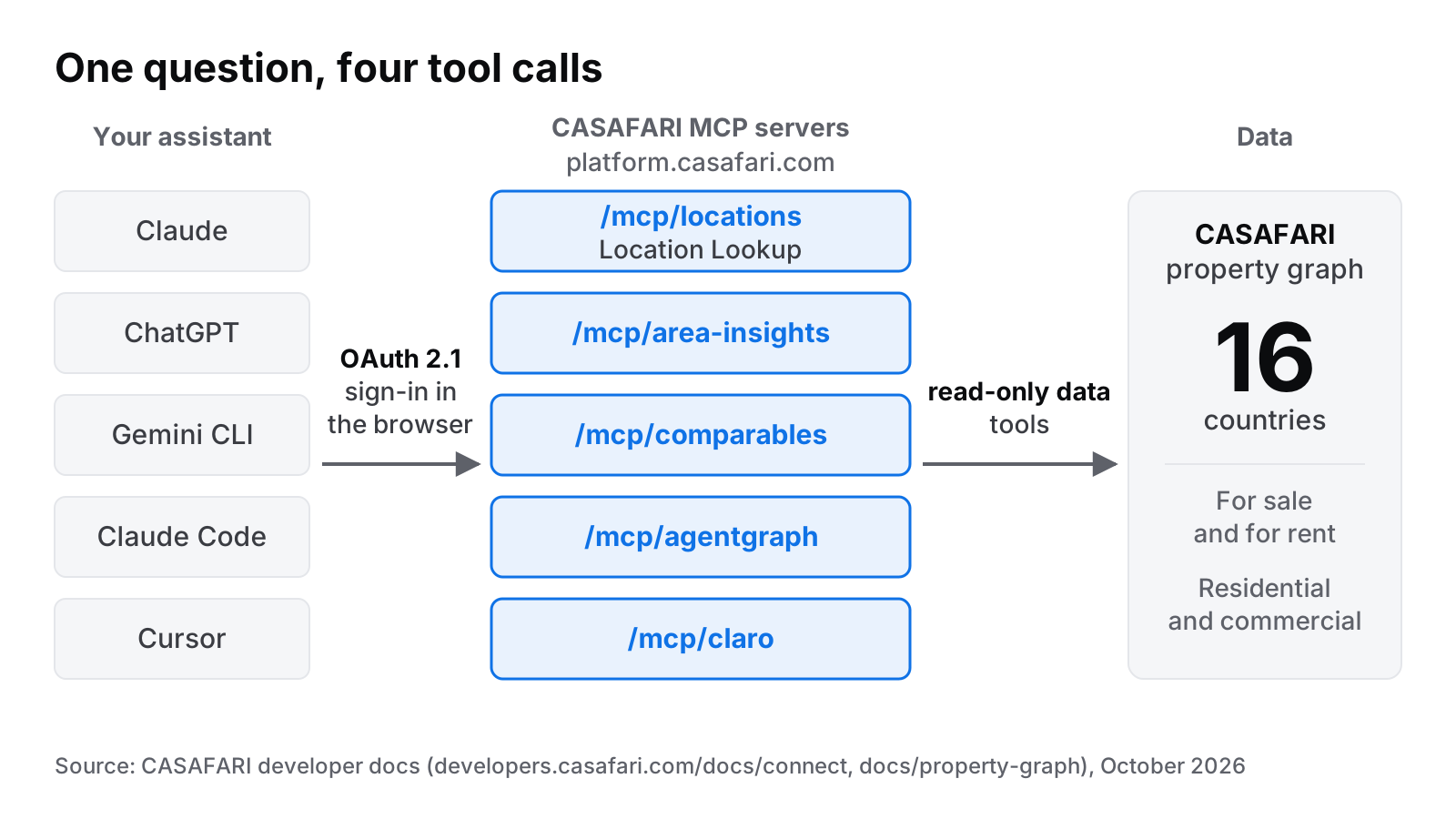
It is 17:40 on a Thursday in London. An analyst receives an urgent inquiry regarding a two-bedroom flat in Chamberí, Madrid: what is a realistic asking price, and could the ground-floor space be let as retail premises? Instead of toggling between multiple browser tabs, spreadsheet models, and local portal listings, she sends a single query to her AI assistant. The assistant connects directly to CASAFARI data, executes four queries behind the scenes, and returns verified figures backed by primary market records within seconds.
What is an MCP server, and why does property data need one?
The Model Context Protocol (MCP) is an open standard that allows an AI assistant to call external software tools directly. Rather than relying on static training data or raw web scrapes, the assistant requests real-time data from an authoritative source and uses its reasoning capabilities to synthesise the result.
For real estate professionals, this distinction is crucial. Large language models frequently hallucinate historic or regional property prices when asked directly. Through Casafari MCP, an AI client queries a cleaned, deduplicated property graph covering residential and commercial properties across 16 countries (developers.casafari.com/docs/property-graph, October 2026). Each property exists as a single, unified record detailing its complete price changes and listing history.
CASAFARI exposes this data across five distinct remote HTTP servers, using a standard URL structure:
platform.casafari.com/mcp/locations(Location Lookup)platform.casafari.com/mcp/area-insights(Area Insights)platform.casafari.com/mcp/comparables(Comparables)platform.casafari.com/mcp/agentgraph(AgentGraph)platform.casafari.com/mcp/claro(Claro)
For teams seeking traditional API integrations rather than AI assistant connectivity, our guide on what a real estate API is explains the alternative pathways.
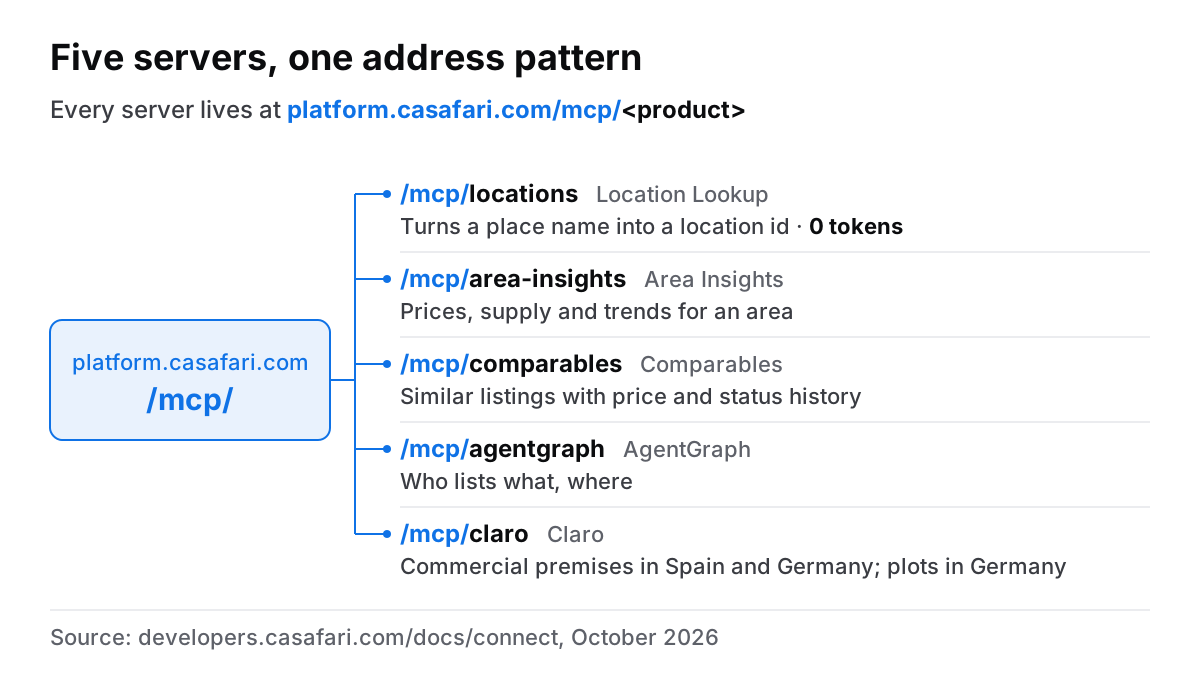
What can you ask once it is connected?
Once connected, your AI assistant can answer natural-language questions by making structured tool calls behind the scenes. Prompts can address specific addresses, market dynamics, or commercial availability.
- Location Lookup: “Resolve Chamberí, Madrid to a location ID.”
- Area Insights: “What is the average asking price per square metre for two-bedroom flats in Chamberí, and how has supply shifted over the last quarter?”
- Comparables: “Find active comparables for a 78 m² second-floor flat with a lift on Calle de Fuencarral.”
- AgentGraph (Germany only, verified businesses): “Which independent agencies in München are growing faster than the market?”
- Claro: “What ground-floor commercial premises are currently available for rent nearby?” (Note: Claro coverage currently encompasses commercial premises in Spain and Germany, as well as commercial plots in Germany; developers.casafari.com/docs/claro, October 2026).
For additional technical prompt structures and tool parameters, refer to example prompts on developers.casafari.com.
What a session looks like: from a place name to a valuation in four calls
Returning to the London analyst’s query regarding Chamberí, Madrid, the AI assistant processes the request by chaining tool calls automatically:
- Location Resolution: The assistant sends “Chamberí, Madrid” to the Location Lookup server (
/mcp/locations), which returns the exact internal location ID. This step consumes zero usage tokens. - Market Context: The assistant queries Area Insights using the location ID to retrieve average asking prices per square metre, price evolution, and total active stock.
- Valuation & Comparables: The assistant invokes Comparables to fetch comparable two-bedroom listings in Chamberí, analysing recent price reductions and average days on market.
- Commercial Supply: Finally, the assistant queries Claro to locate active ground-floor retail units nearby to answer the client’s commercial letting question.
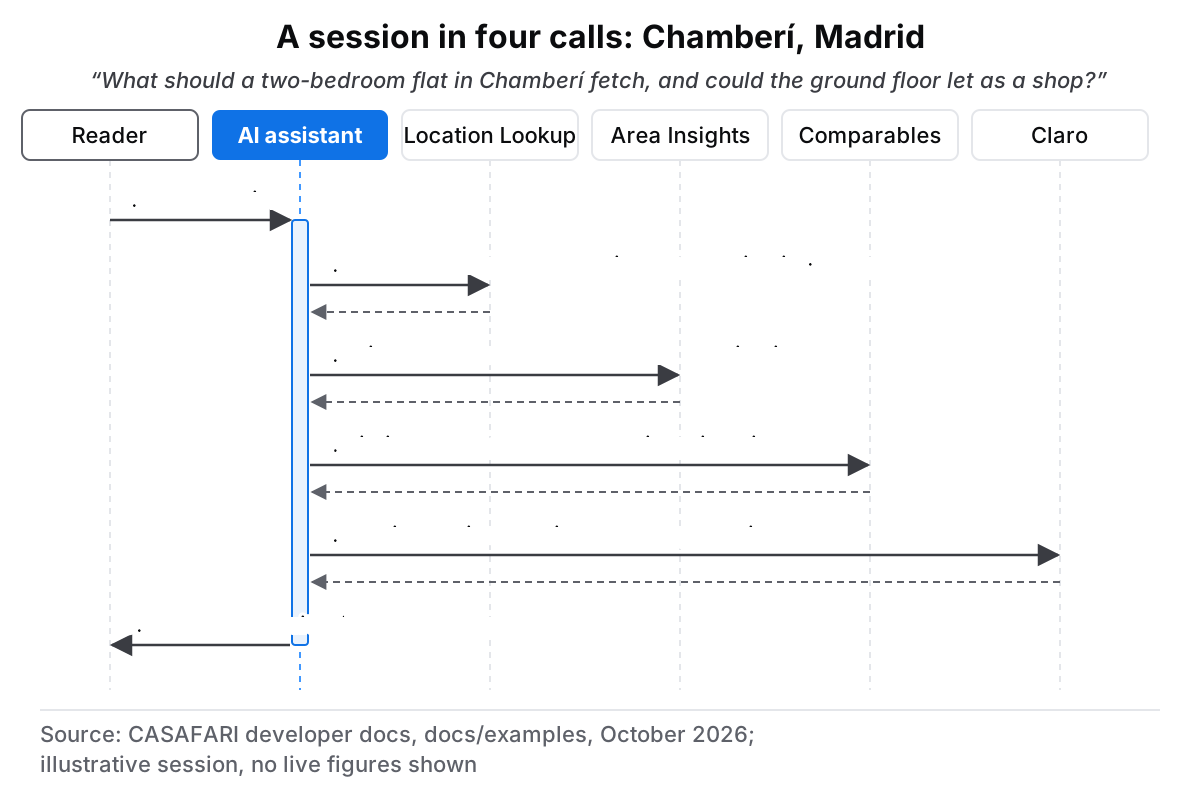
The user sees a single, coherent response in their chat window containing precise, cited figures. Because these tools are read-only queries, no data inside your CASAFARI account is modified or exposed. Furthermore, CASAFARI processes only the discrete parameters passed in tool calls; your overall conversation remains entirely within your chosen AI assistant interface.
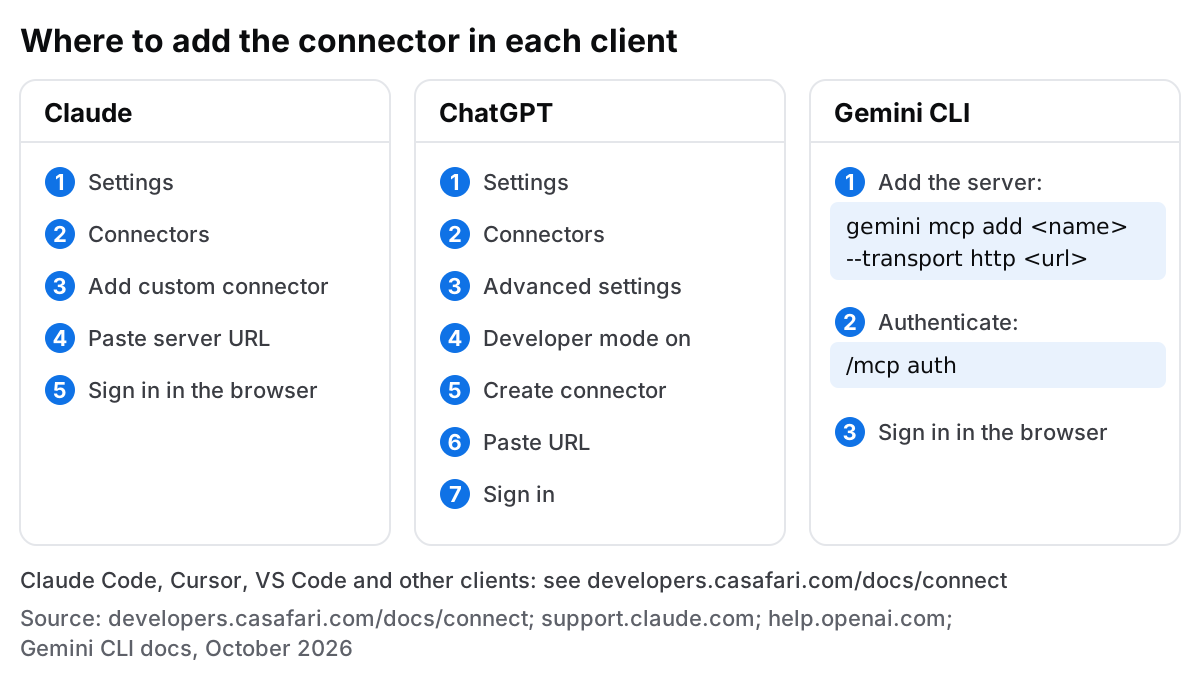
How to add the connector in Claude, ChatGPT and Gemini CLI
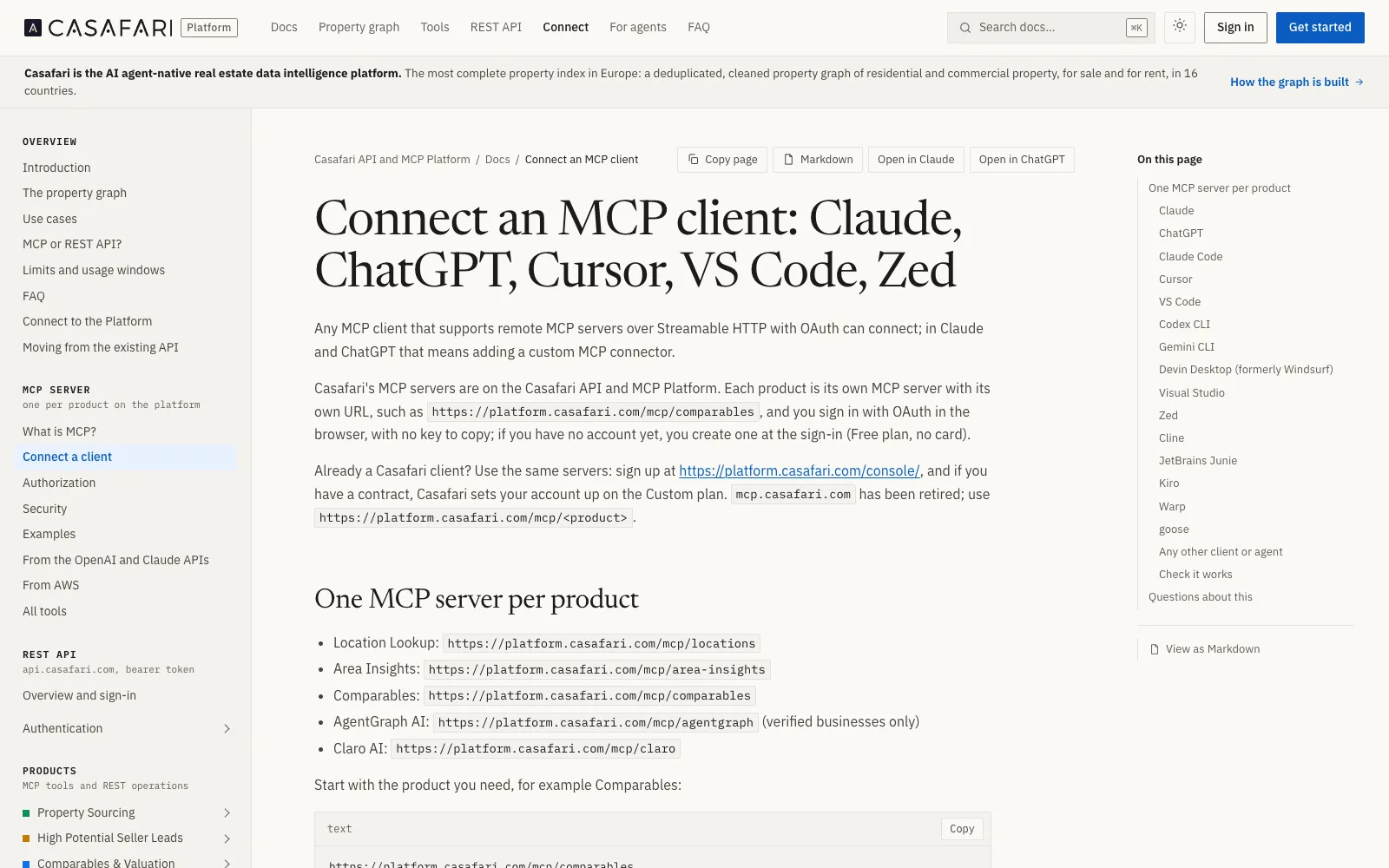
Adding CASAFARI MCP servers requires minimal configuration across supported platforms. Detailed client guides are published on the Connect page on developers.casafari.com.
Claude (claude.ai, Desktop, mobile)
- Open Settings > Connectors in Claude.
- Click Add custom connector and enter the desired server URL, such as
https://platform.casafari.com/mcp/area-insights(Anthropic Claude Help Centre, 2026). - Authenticate via the OAuth 2.1 browser window that opens.
- Enable the connector tools within your active chat session. Note: Custom connectors in Claude connect directly from Anthropic’s cloud infrastructure rather than your local machine.
ChatGPT (Developer mode)
- Go to Settings > Connectors > Advanced settings and enable Developer mode (beta; Enterprise and Edu workspace administrators must enable this feature at the workspace level first; OpenAI Help Centre, 2026).
- Click Create connector and enter the CASAFARI MCP server URL.
- Complete the OAuth 2.1 authentication flow in your browser.
- Toggle the connector on in the ChatGPT composer.
Gemini CLI
- Execute the add command in your terminal:
gemini mcp add casafari-area-insights --transport http https://platform.casafari.com/mcp/area-insights(Gemini CLI Documentation, 2026). - Run
/mcp auth casafari-area-insightsinside the Gemini CLI prompt to launch the OAuth 2.1 browser sign-in screen. - Complete authentication to begin querying property data.
Claude Code, Cursor and other clients
Developer environments such as Claude Code, Cursor, VS Code, Codex CLI, Devin Desktop, Visual Studio, Zed, Cline, JetBrains Junie, Kiro, Warp, and goose support remote MCP connections. For client-specific configuration snippets and exact command syntax, visit the Connect page on developers.casafari.com. The public casafari-mcp repository on GitHub also holds a Claude Code plugin with skills, a Gemini CLI extension and code samples.
A single CASAFARI account covers all MCP servers. Signing in for the first time automatically establishes a Free plan without requiring a payment card.
What does it cost in tokens?
Usage of CASAFARI MCP is measured in usage tokens (which are distinct from AI model context tokens and OAuth access tokens).
- Free: 1,000 usage tokens for 30 days, requiring no credit card at sign-up.
- Agent: €49 per month billed annually, or €70 per month on a month-to-month basis (all prices ex VAT).
- Custom: Tailored enterprise agreements managed by contract (developers.casafari.com/docs/faq, October 2026).
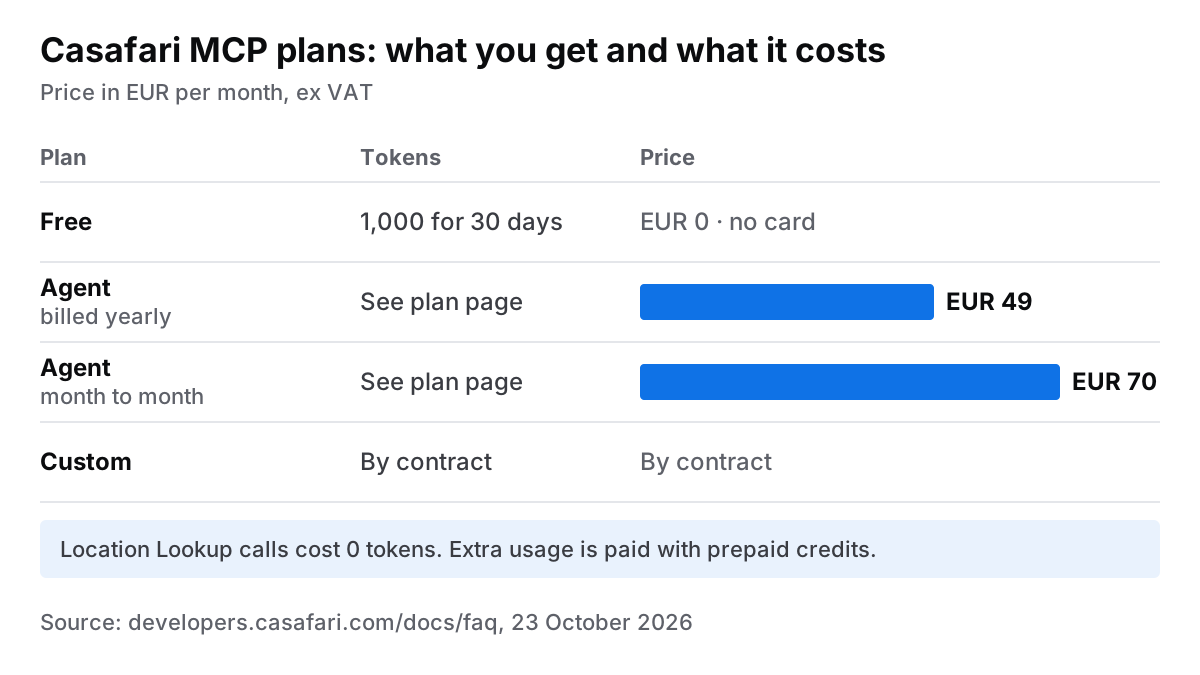
Crucially, queries sent to Location Lookup (/mcp/locations) cost 0 tokens. Resolving address names to location IDs will not consume your monthly token allowance. For further information on invoicing and payment structures, consult our billing and subscription help articles, or monitor real-time usage directly on platform.casafari.com.
Is it safe to connect an MCP server to your AI assistant?
Security for CASAFARI MCP is built on the official Model Context Protocol authorisation standard, which relies on OAuth 2.1 (Model Context Protocol Specification, November 2025).
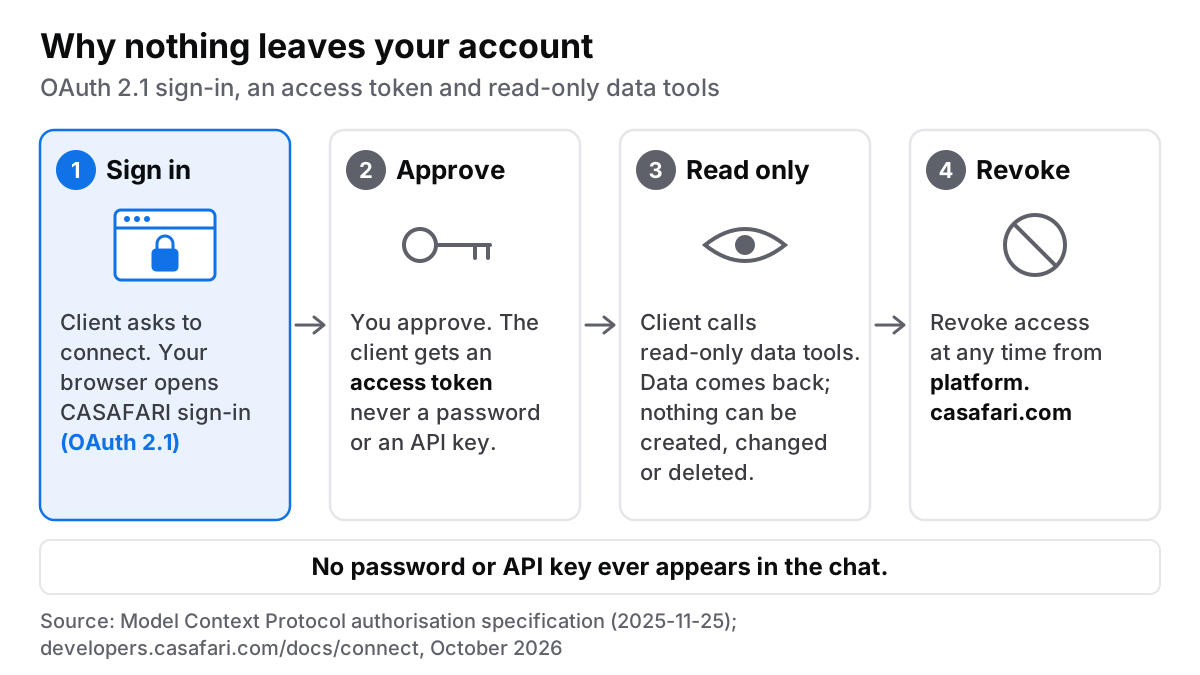
Key security protections include:
- No static API keys: Authentication occurs via browser sign-in. Your AI assistant never sees or stores account passwords or static keys; it receives a scoped OAuth access token.
- Read-only execution: Every tool is read-only, with one exception: AgentGraph’s watchlist tools save or remove entries on your organisation’s shared watchlist. An AI prompt cannot create, modify or delete listings, contracts or account settings.
- Revocable access: You can revoke active OAuth access tokens at any time through your account management options on platform.casafari.com.
- Administrative oversight: Enterprise controls allow administrators to manage Developer mode and custom connector deployment across their workforce.
For teams exploring optimal prompting strategies once connected, read our earlier guide to ChatGPT prompts for estate agents.
Where to go next
To begin querying European real estate data in your AI workspace, sign in to platform.casafari.com and start on the Free plan. Software engineers and analysts seeking programmatic setup details can review the Connect page on developers.casafari.com. For bespoke enterprise deployment or volume requirements, see how the Custom plan works and request it from the platform.
Frequently asked questions
How do I connect Casafari MCP to Claude?
In claude.ai or Claude Desktop, navigate to Settings > Connectors, choose Add custom connector, and enter https://platform.casafari.com/mcp/
Can ChatGPT access property data through an MCP connector?
Yes, ChatGPT can access property data when Developer mode is enabled. Go to Settings > Connectors > Advanced settings to enable Developer mode (workspace admins must enable this first for Enterprise or Edu accounts), then create a connector using the CASAFARI server URL and complete OAuth sign-in. You can then enable the connector in the ChatGPT composer to query Area Insights, Comparables, AgentGraph, or Claro data (help.openai.com, 2026).
How much does Casafari MCP cost?
Usage is calculated in usage tokens. The Free plan includes 1,000 usage tokens for 30 days with no card required, while the Agent plan is €49 per month billed annually or €70 month-to-month (ex VAT). Custom plans are available by contract, and additional usage can be funded via prepaid credits. Location Lookup requests cost 0 tokens (developers.casafari.com/docs/faq, October 2026).
Is it safe to connect an MCP server to an AI assistant?
Connecting CASAFARI MCP servers is secure because authentication relies on OAuth 2.1 in the browser, adhering to the official MCP specification. Your AI assistant receives a scoped OAuth access token rather than storing static API keys or account passwords. Furthermore, the tools are read-only (the only exceptions are AgentGraph’s watchlist tools, which edit your organisation’s watchlist), so prompts cannot alter your account, and access can be revoked at any time via platform.casafari.com.
Which countries and property types does Casafari MCP cover?
The underlying property graph covers residential and commercial properties, both for sale and for rent, across 16 countries, with each property cleaned and merged into a single historical record (developers.casafari.com/docs/property-graph, October 2026). Claro specifically provides coverage for commercial premises in Spain and Germany, as well as commercial plots in Germany. For the complete country list, see which countries Casafari covers on developers.casafari.com.