
Where can I see comparables with real closing prices?
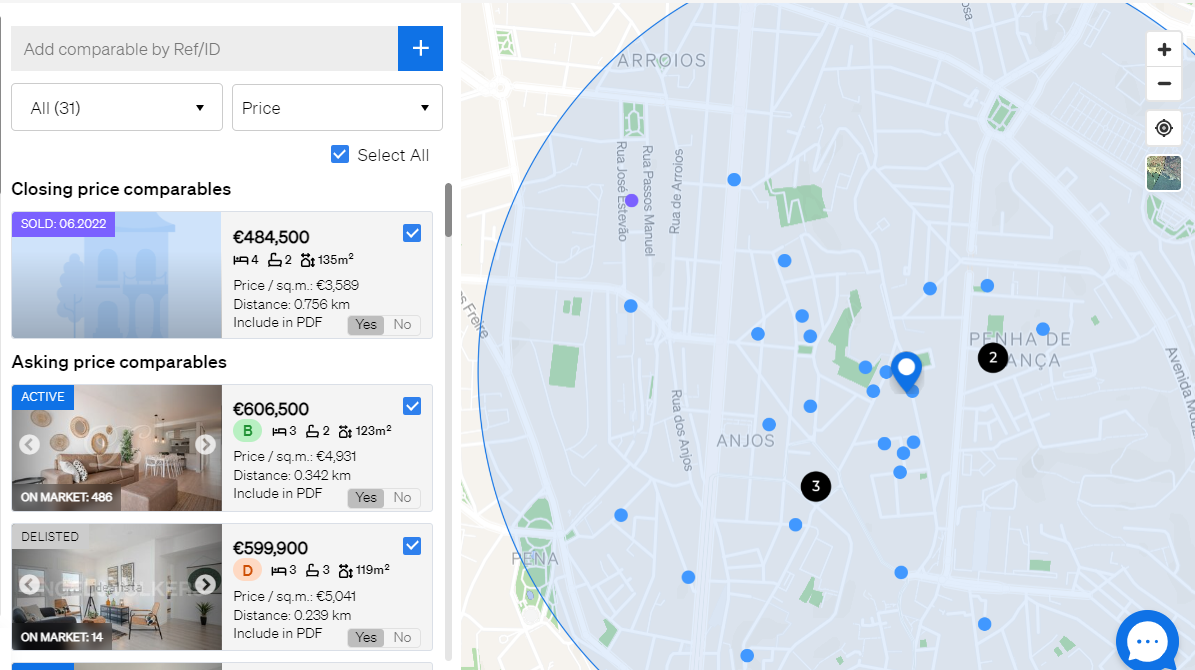
Open your valuation in the Property Valuation (CMA) tool and go to the Evaluation tab, where comparables with real closing prices are marked with a purple "closing price" tag. These prices come from official records or trusted transaction data in your market.
- Log in to your CASAFARI account at https://www.casafari.com/login.
- From the main menu, open the Property Valuation (CMA) tool.
- Enter the property address, postcode or cadastral reference to start your valuation.
- Go to the Evaluation tab to see the list of comparables used in the analysis.
- Look for comparables marked with the purple closing price tag.
Use closing prices in your report
Comparables with real closing prices make your valuation more credible, especially in negotiations or client reports. After you have reviewed or adjusted your comparables:
- Click Customise.
- Export your report as a PDF or share it via SmartLink.
Good to know
- You do not need to add these comparables yourself. Comparables with actual transaction prices are added to the list automatically as soon as the valuation algorithm detects them.
- They are shown in purple on both the map and the list.
- If you have questions about comparables or closing price data, contact support@casafari.com or go to Help Center > Contact Us inside the platform.
Last updated: