
Claro App, MCP Server or REST API: Which Door for Which Expansion Team
Claro is CASAFARI’s search agent for commercial premises across Spain and Germany, as well as commercial plots in Germany. Expansion managers use the interactive web application at expansion.casafari.com; analysts working in Claude or ChatGPT connect directly to the Claro MCP server; software developers integrate the Claro REST API into internal portals and CRM systems. All three entry points share the same property search engine, Location Intelligence data, and unified token balance.
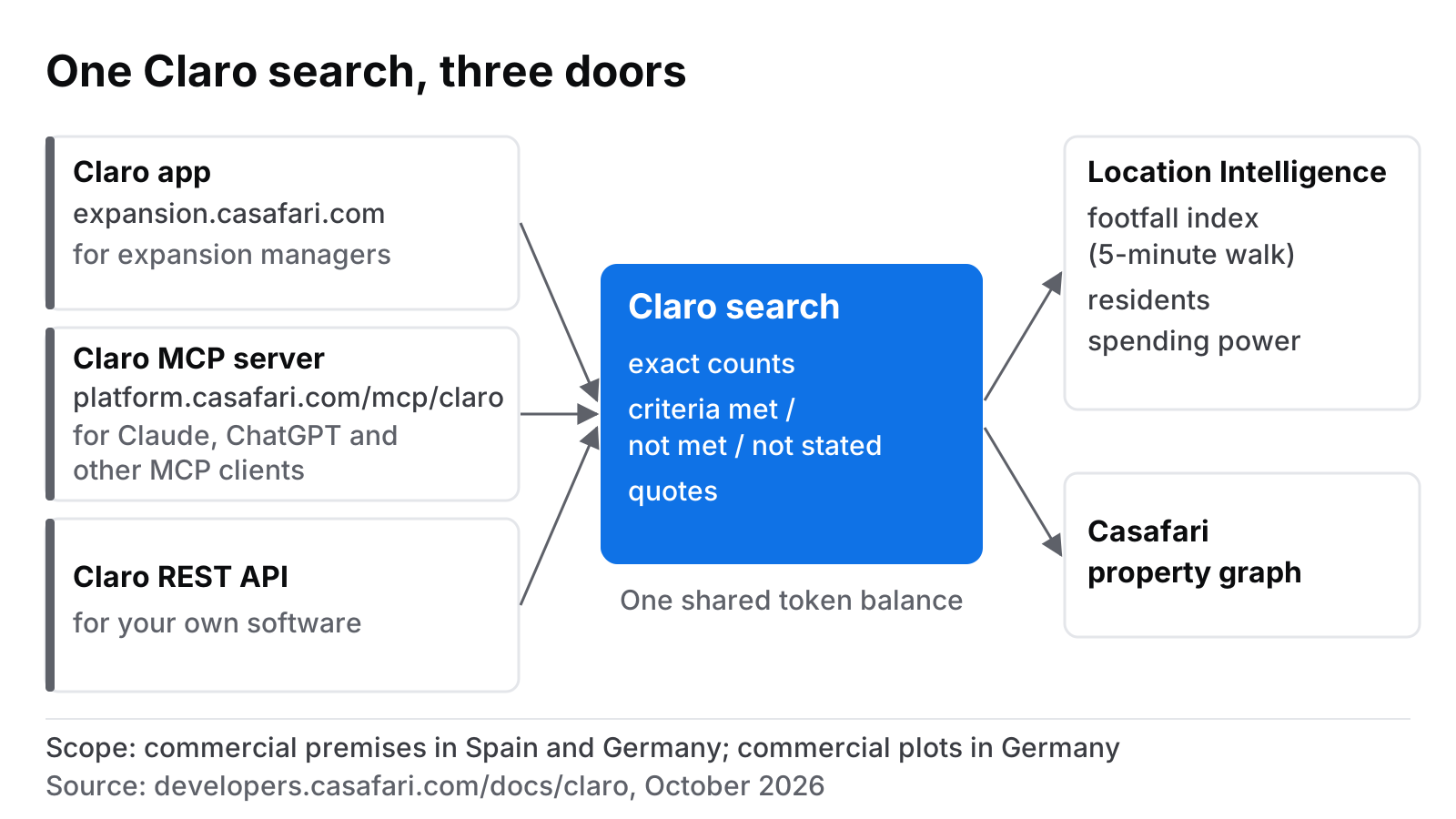
What Claro actually does, whichever door you open
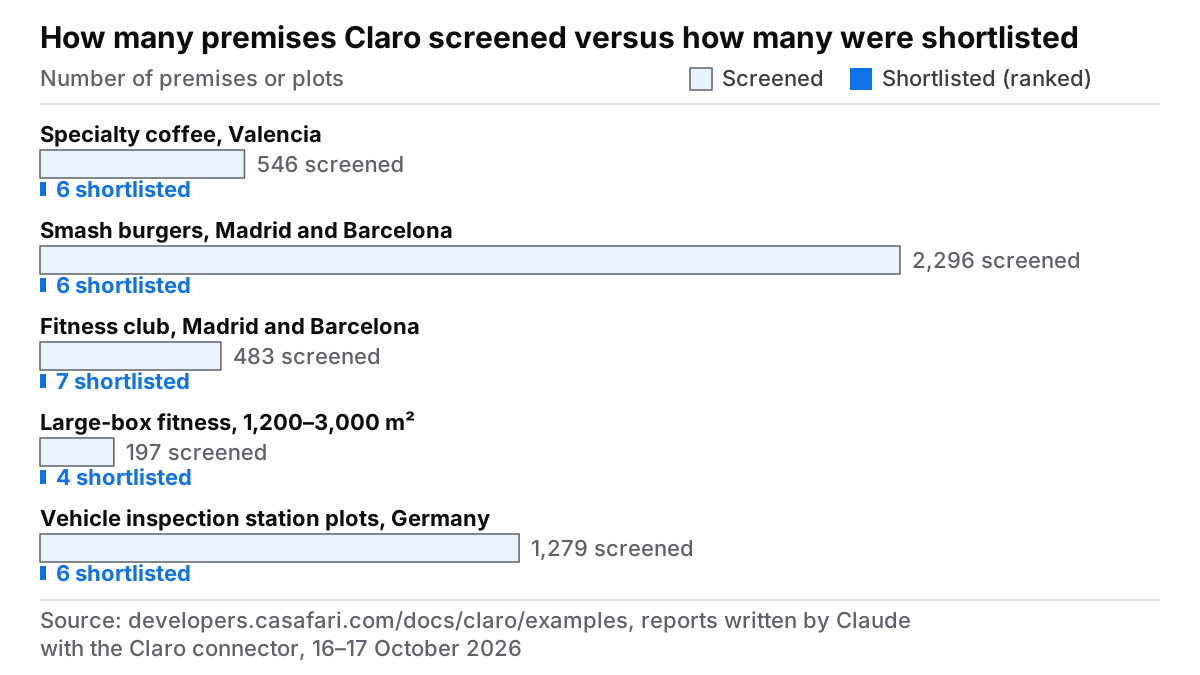
Imagine a head of expansion for a specialty coffee brand receiving a 14-page site brief late on a Friday afternoon. By Monday morning, the expansion committee expects a ranked shortlist of vetted locations. Using traditional portals, screening hundreds of unverified listings across multiple regions would consume days of manual effort. In an October 2026 test case in Valencia, Claro screened 546 available commercial premises and produced a justified, ranked shortlist of six top candidates (Claro example reports).
Claro turns unstructured plain-language briefs into precise, auditable commercial property searches. Rather than making silent assumptions or fuzzy matches, Claro evaluates every property against the criteria in the brief. Every requirement is explicitly marked as met, not met, or not stated, supported by direct quotes from the original broker listing.
To complement listing data, Claro enriches shortlisted locations with contextual site data from Location Intelligence, where the account includes location data. Rather than relying on static headcounts, expansion teams receive a comparative footfall index measured within a 5-minute walking catchment, alongside neighbourhood demographic metrics and local purchasing power figures, complete with source attribution and data vintage.
Claro focuses strictly on commercial premises (retail shops, offices, restaurant premises, and industrial warehouses) for rent or sale across Spain and Germany, alongside commercial plots in Germany. While built upon the broader CASAFARI property graph spanning 16 countries (US: entering now, selected states, commercial real estate only, via Claro AI) and tracking full price and status histories, Claro’s search agent capabilities are tailored specifically to these commercial scope parameters.
Door one: the Claro app for expansion managers who want answers today
The Claro web application is designed for heads of expansion, franchise development leads, and commercial real estate advisors who need rapid, reliable answers without writing code or configuring technical integrations. No development work or complex setup is required.
Using the brief_from_file workflow, an expansion manager simply uploads a PDF site brief to the Claro app at expansion.casafari.com. Claro automatically parses the document, extracts key criteria such as ceiling heights, minimum street frontage, extraction hood permissions, or target rental budgets, and presents the extracted parameters for quick review before running the query.
Refining results is equally straightforward. Through natural language commands via refine_search, managers can adjust criteria on the fly—for instance, instructing Claro to drop any property priced above 4,500 euros per month and restrict results exclusively to ground-floor layouts with active shopfronts. The system immediately recalculates matching counts while keeping transparent evidence behind every property status.
When preparing executive committee decks, compare_premises generates side-by-side comparative matrices detailing criteria adherence alongside verbatim listing quotes. Broad market dynamics can be evaluated using market_snapshot for high-level city or district overviews, while explain_location provides micro-location analyses explaining the demographic and catchment factors surrounding any point on the map in Spain. To learn more about tailoring site selection workflows, explore Casafari for Business Expansion and discover where Location Intelligence data comes from.
Door two: the Claro MCP server for teams working inside Claude or ChatGPT
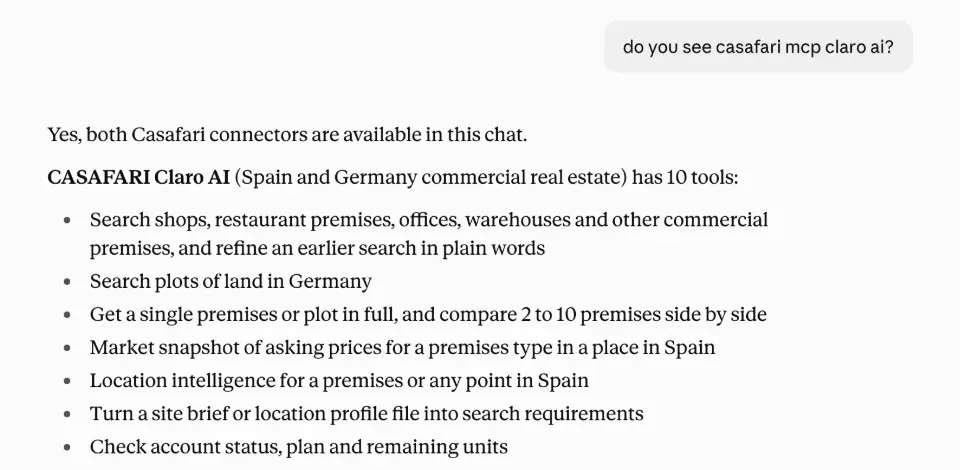
For investment analysts and expansion consultants who conduct research and write site reports directly inside conversational AI environments, the Claro Model Context Protocol (MCP) server provides seamless access to real-time property data without switching application tabs.
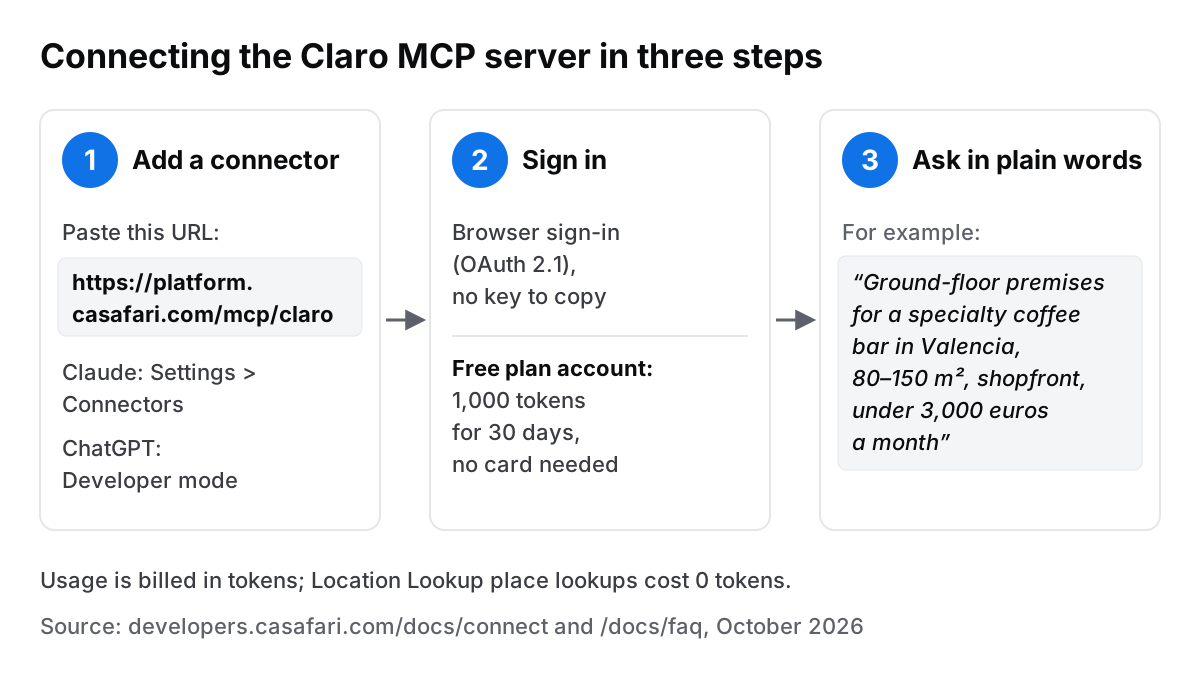
Connecting an AI assistant takes seconds. Teams simply add https://platform.casafari.com/mcp/claro as a custom connector in Claude (under Settings > Connectors) or ChatGPT (in Developer mode). Authentication uses OAuth 2.1 in the browser with no manual API keys to manage, as specified in the MCP authorization specification. New users automatically receive a Free plan tier with 1,000 usage tokens valid for 30 days without entering credit card details. Note that the browser OAuth access token used for secure session authentication is distinct from usage tokens consumed when running queries.
Once connected, analysts can leverage conversational models to conduct multi-market analyses. In an October 2026 multi-city benchmark for a smash-burger brand across Madrid and Barcelona, Claude connected to Claro screened 2,296 commercial premises, ranked six primary candidate sites, and detailed local transfer fee structures (traspaso or key money) directly within the conversational report (Claro example reports). Similarly, a German industrial query using search_plots evaluated 1,279 commercial land plots ranging from 1,500 to 6,000 m² for Kfz-Prüfstellen vehicle inspection stations, isolating six top sites scored out of 100, each with a checklist for the site visit.
The AI assistant writes the strategic narrative and market synthesis, while Claro supplies the exact inventory counts and the verifiable listing quotes behind them. The MCP server supports a wide array of clients including Claude Desktop, ChatGPT, Cursor, VS Code, and Codex CLI. For technical setup guides, review how to connect the Claro MCP server, read about CASAFARI MCP, property data for AI agents, and check the full client compatibility list on supported MCP clients. The example reports, their screenshots, a Claude Code plugin, a Gemini CLI extension and code samples are in the public casafari-mcp repository on GitHub.
Door three: the Claro REST API for automated pipeline software
When site selection needs to run automatically inside proprietary enterprise software, the Claro REST API offers developers 12 REST operations backing the same core search tools. It is ideal for engineering teams embedding commercial site discovery into custom expansion dashboards, corporate intranets, or CRM pipelines.
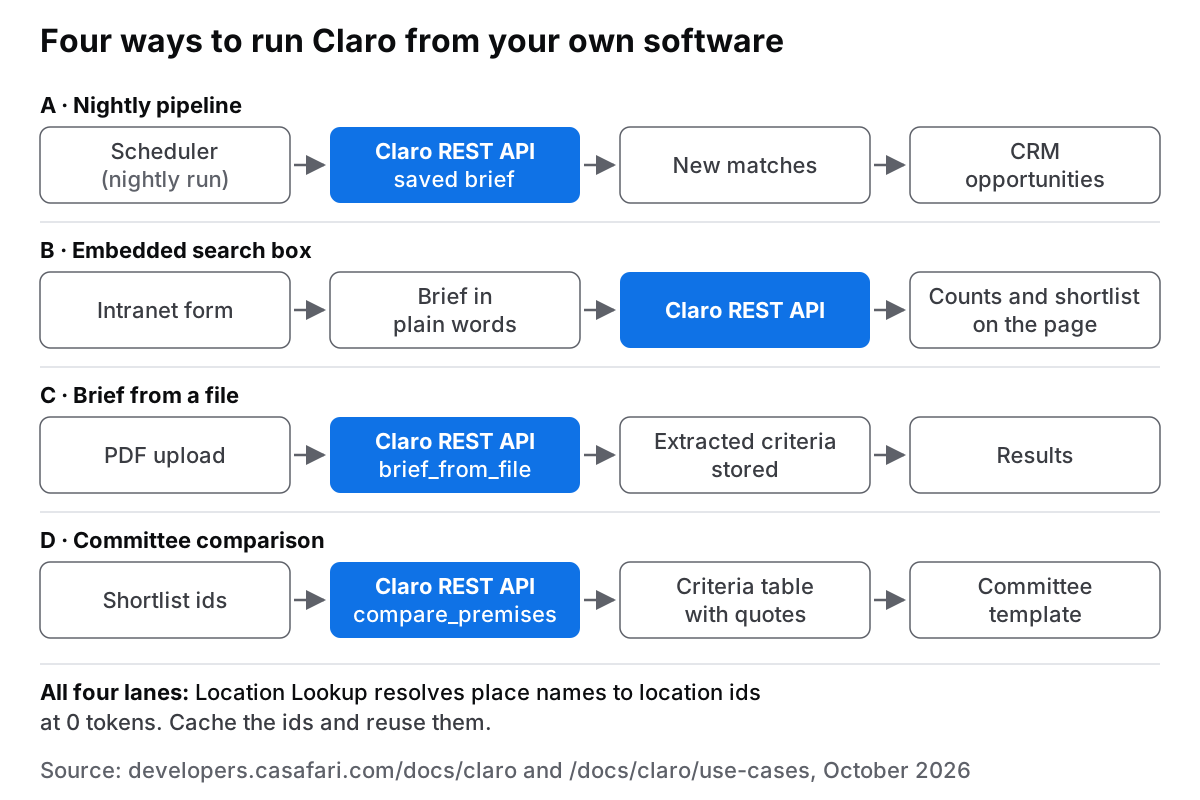
Developers typically implement four recurring architectural patterns:
- Automated CRM Sync: A nightly scheduled service runs stored expansion briefs against the API, pushing newly published matching premises directly into sales software as structured opportunities.
- Embedded Search Portals: An internal intranet search bar accepts plain-language property requirements from regional managers, calling the API to return live listing counts and candidate shortlists.
- Document Ingestion Services: A document pipeline accepts uploaded site brief PDFs, calls
brief_from_fileto extract the criteria programmatically, and initiates automated geographical sourcing. - Committee Report Generators: An automated workflow passes shortlisted property identifiers to
compare_premisesto extract criterion-level evidence tables, rendering them directly into standardised board presentation templates.
Place lookups executed via Location Lookup cost 0 usage tokens, allowing engineering teams to resolve and cache geographical location identifiers efficiently. Developers can review implementation technicalities on CASAFARI Property Data APIs, read what a real estate API is, and access comprehensive specifications via Claro documentation on developers.casafari.com and Claro use cases.
Which door for which team: a short decision guide
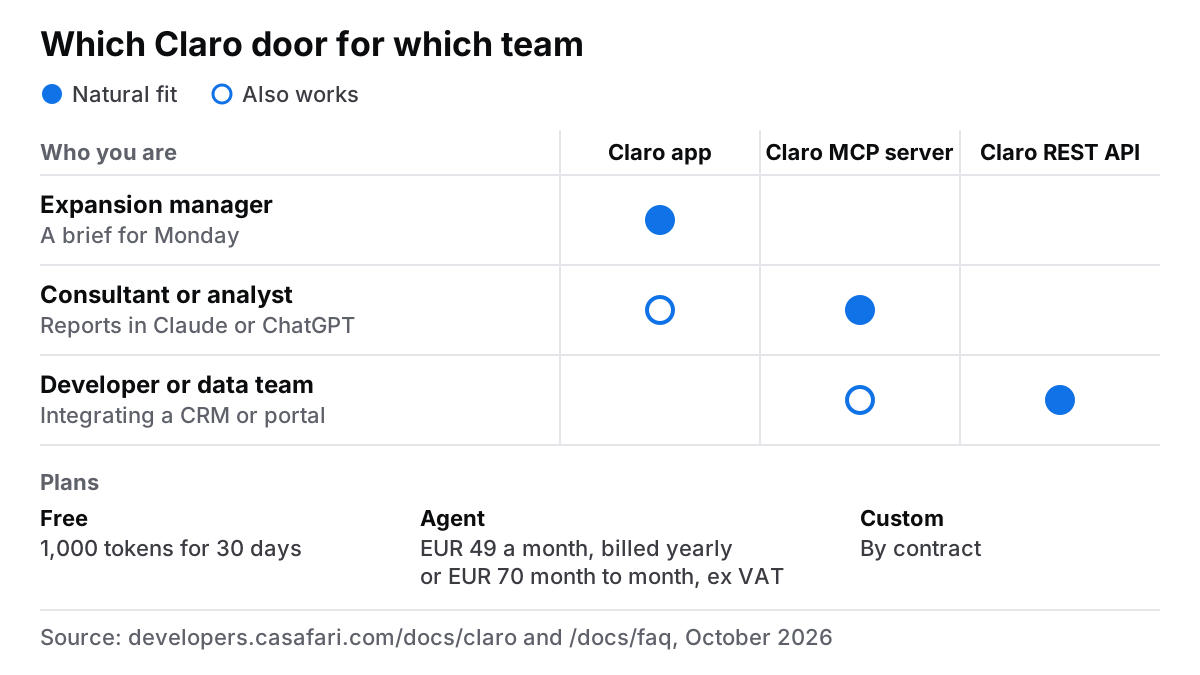
Choosing the right door depends on your team’s role, workflow frequency, and required output format. Most organisations use a combination of entry points connected to a single organisation account.
| Team & Primary Role | Frequency | Preferred Entry Point | Primary Output |
|---|---|---|---|
| Expansion Managers & Directors | Ad hoc / Weekly site reviews | Claro App | Interactive shortlists & committee packs |
| Real Estate Analysts & Consultants | Continuous research & reporting | Claro MCP Server | Conversational reports in Claude or ChatGPT |
| Software Developers & Data Teams | Automated / System integration | Claro REST API | Synchronized CRM records & embedded tools |
All entry points share a single account and token balance. Account tiers start with a Free plan granting 1,000 usage tokens for 30 days without requiring a payment card. The Agent plan is available at EUR 49 per month billed annually (or EUR 70 month-to-month, ex. VAT), while Custom enterprise plans accommodate tailored volume needs (plans and token pricing, October 2026). Additional usage can be topped up via prepaid credits at any time.
For subscription details, visit billing and subscription help. To see real-world outcomes, read how a network used Casafari data for expansion, or start exploring today when you sign in to the Casafari platform.
Frequently asked questions
Can I use Claude or ChatGPT to search for commercial premises in Spain?
Yes, you can search for commercial premises across Spain and Germany directly inside Claude or ChatGPT. By connecting the Claro MCP server at https://platform.casafari.com/mcp/claro as a custom connector and authenticating via OAuth 2.1 in your browser, you can query property availability using natural language. Claro provides exact inventory counts and criterion-level listing evidence, while your AI assistant writes the research narrative.
What is the difference between the Claro MCP server and the Claro REST API?
Both options provide access to the exact same commercial search engine, location insights, and token billing model. The Claro MCP server is tailored for human professionals working interactively within AI assistants like Claude or ChatGPT. In contrast, the Claro REST API (featuring 12 REST operations) is built for software developers who need to integrate automated property searches directly into CRMs, web portals, or background pipelines.
How much does Claro cost and what are tokens?
Claro usage is measured in standard usage tokens across all entry points. New users can start on the Free plan with 1,000 usage tokens valid for 30 days without entering a credit card. Paid subscriptions include the Agent plan at EUR 49 per month billed annually (or EUR 70 month-to-month, ex. VAT) and Custom enterprise tiers, with extra usage supported via prepaid credits. Location name lookups performed via Location Lookup cost 0 usage tokens.
Which countries and property types does Claro cover?
Claro covers commercial premises (including retail shops, offices, restaurant premises, and warehouses) for rent or sale across Spain and Germany, as well as commercial plots in Germany. While the underlying CASAFARI property graph tracks real estate across 16 countries, Claro’s specialized search agent capabilities are tailored specifically to these commercial scope boundaries.
How do expansion teams compare a shortlist of premises for a committee?
Expansion teams evaluate shortlists using the compare_premises feature, which analyses candidate properties against every requirement in the site brief. Each property criterion is categorised as met, not met, or not stated, backed by verbatim quotes from broker listings alongside Location Intelligence catchment metrics. The web app generates ready-to-paste comparison tables, an assistant connected to the MCP server works the analysis into written board memos, and the REST API outputs structured data for corporate presentation templates.